

Event Management Software Market Statistics (Trending Insights)
The global event management software market is experiencing strong and sustained growth as businesses rapidly shift toward digital and hybrid event experiences. In 2025, the market size is estimated at USD 9.3 billion, and it is projected to reach USD 17.3 billion by 2030, growing at a CAGR of around 13.2%. This growth is driven by increasing demand for automation, real-time analytics, and seamless event execution across industries. (Source)
Another major estimate shows the market expanding from USD 7.2 billion in 2025 to USD 14.7 billion by 2034, highlighting consistent long-term adoption of event management platforms across enterprises and SMEs. (Source)
Eventify Platform Overview
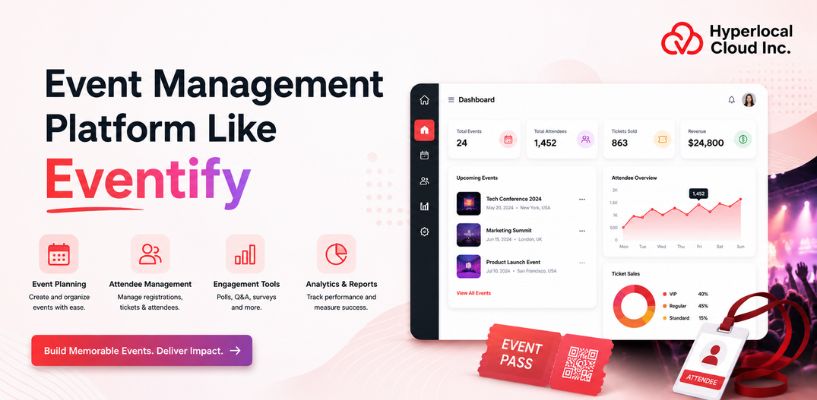
The Eventify platform is a modern, all-in-one event management solution designed to simplify how businesses plan, execute, and manage events of any scale. It combines core functionalities such as event creation, ticketing, attendee registration, scheduling, and engagement tools into a single unified system. By digitizing the entire event lifecycle, platforms like Eventify help organizers eliminate manual processes, reduce operational complexity, and deliver more structured and interactive event experiences.
Start Your Event Management Journey Today!
How an App Like Eventify Works: Complete Process
Let’s understand how an event management app like Eventify works from setup to post-event analysis.
1. Event Creation by Organizer
Event organizers create and configure the event by adding key details such as the agenda, speakers, exhibitor booths, registration forms, branding elements, and overall event structure.
2. Exhibitor Onboarding and Setup
Exhibitors are onboarded and provided with personalized virtual booths. They can showcase products or services, set up meeting schedules, and use lead capture tools to engage with attendees effectively.
3. Attendee Registration and Discovery
Attendees explore event details, view the agenda and exhibitors, and register through the platform. Once registered, they receive access credentials to join and navigate the event seamlessly.
4. Event Participation and Engagement
During the event, attendees participate in sessions, visit exhibitor booths, and interact with other participants. Features like QR codes, live polls, chat, and Q&A sessions enhance engagement and interactivity.
5. Post-Event Follow-Up and Analytics
After the event, organizers review detailed analytics and feedback to measure performance. Attendees can also access session recordings and downloadable resources, helping extend the value of the event beyond its live duration.
How An Eventify Clone Boosts Your Event Business
There are several benefits that an app like Eventify offers to the businesses, some of which include:
| Benefit | Description |
| Centralized Management | A single dashboard allows event organizers to handle all registration activities, schedule management, and attendee information tracking. |
| Upgrade Registration and Ticketing | The registration and ticketing system operates efficiently through customized forms that allow users to select from different ticket categories and complete secure online payment processing. |
| Sponsor and Exhibitor Visibility | The platform provides specific areas that showcase products through sponsored ads, QR code lead scanning, and product showcases. |
| Data and Analytics | Real-time data on attendance and engagement statistics allows event planners to improve their future events using data analysis. |
| Automation | Automated email processes are used to deliver reminder and notification messages via set-up workflows. |
| Improved Engagement | The platform also provides most of the users with enhanced interaction through its interactive capabilities, including gamification, live question and answer, polls, and private social feeds. |
| Networking | The platform offers the user booking features, in-app chat services, and discussion forums. |
| Easy Navigation | The system provides two essential features that enable users to navigate the event venue effectively. |
| Seamless Check-in | The app is helpful in business organizations as it gives the attendees a chance to check in to the event through their QR codes. In this way, the waiting period at the entry is reduced. |
| Information Access | Users can obtain speaker details and event updates and access a built-in guidebook for the event. |
Main Features Included In The Event Management App Like Eventify
There are three panels with various features. These panels include the admin, exhibitor, and attendee panels. Let’s explore the features of each panel:
Admin Panel (Organizer) Features
1. Registration & Ticketing Management
Organizers can design flexible registration forms and ticket types like early-bird or VIP, ensuring attendees have a smooth booking experience. They are able to charge, give discounts/promotions/sales, and conduct real-time sales, as well as build waitlists of participants.
2. Content Management
Organizers can quickly update event details, session schedules, speaker info, and maps, keeping attendees informed in real time. A no-code site builder can also be used by the organizers to create an event landing page.
3. Branding & Customization
Organizers can customize the app with logos, colors, banners, themes, and menus, reflecting their event’s unique branding.
4. Attendee & Speaker Management
Organizers can manage attendees, assign roles, approve speaker profiles, and set permissions for smoother event coordination.
5. Communication Tools
Push notifications and email workflows help organizers keep attendees aligned throughout the event, especially when schedules change or multiple sessions run in parallel.
6. On-Site Operations
Organizers can handle QR-based check-ins, on-demand badge printing, and lead scanning to reduce queues and improve staff efficiency.
7. Analytics & Reporting
Real-time analytics give organizers insights into registrations, attendance, and engagement, supporting smarter event decisions.
8. Sponsor/Exhibitor Management
Organizers can manage exhibitor profiles, showcase products, assign booth space, and track leads to maximize sponsor ROI.
Exhibitor/Sponsor Panel Features
1. Profile & Showcase Management
Exhibitor profiles act as a digital storefront within the event, allowing brands to present their offerings before and during the event
2. Visibility
Use sponsored ads, banner placements, and being visually listed on floor maps and in the event guide in order to maximize your visibility.
3. Meeting Management
Exhibitors can schedule one-on-one meetings and connect with attendees who show interest in their products or services.
4. Staff Management
Exhibitors’ permission-granting and multiple staff members’ booth managing and attendee-interacting, facilitating event day management streamlining, with the help of staff management.
5. Analytics Access
Exhibitors can view real-time analytics, including profile visits, engagement stats, and leads, to track performance effectively. Thus, it helps in demonstrating ROI and assisting them in performance tracking.
6. Visibility & Promotions
The sponsors and exhibitors can be given great visibility through some promotional methods. These include banner advertisements, push notifications, and so on, by the organizers.
7. Meeting & Chat Features
Exhibitors can interact with visitors through one-on-one text, video, and picture chat. By making appointments, attendees can verify the schedule with interested parties.
8. Customizable Profiles & Branding
Using the customizable profile and branding, exhibitors can add their corporate logo and banner, social media links, contact details, and company descriptions.
9. Product & Content Showcase
This feature allows exhibitors to attach product details, including a photo and description. They can add uploaded resources like PDFs, brochures, and videos.
Attendee Panel (User) Features
1. Personalized Agenda
Attendees can create their own agenda with session details and speaker info to stay on track with relevant events. It enables them to set alerts and link the schedule to their personal calendars.
2. Interactive Tools
Attendees can engage with live polls and submit questions, turning passive sessions into interactive experiences. They are able to post to a closed group board and engage in gamification battles that have leaderboards and completion of tasks.
3. Event Navigation
Attendees can explore interactive maps and floor plans to locate sessions, booths, and amenities quickly and efficiently.
4. Content Access
Attendees can access the content, see the exhibitor product displays, get session materials/documents, and read event-related news and guides.
5. Live Polls & Q&A
Live polls and Q&A let attendees ask questions and vote on topics directly, making sessions more engaging and dynamic.
6. Gamification
Custom challenges and a live leaderboard will help attendees track their progress. The participants could receive points and rewards to increase participation.
7. Social Feed
Post share updates, photos, and videos on a social platform exclusive to attendees and organizers, available only to event attendees.
8. Surveys & Feedback
The attendees will be able to provide practical feedback and the evaluation of the individual sessions, which will help organizers to make future events more successful.
9. Push Notifications
Attendees will get to know about the changes in sessions or other important information instantly, along with announcements and reminders on their mobile phones.
10. Customizable Profiles
The customizable profile feature allows attendees to edit their profiles, bringing out their interests and expertise to enable meaningful connections.
11. In-App Messaging & Meetings
The attendees are able to conduct one-on-one text communication, which is secure, and can schedule personal meetings with other attendees, speakers, or exhibitors.
12. QR Code Networking
Scan the QR code of other attendees, and they can exchange vCards and other connection details instantly.
Launch Your Own Event Platform Today!
Transforming Your App Like Eventify With Artificial Intelligence
Businesses can add several AI-powered features to the Eventify clone app to enhance its functionality. Here are some of the advanced features:
1. AI Copilot/Concierge
This app features a 24/7 smart assistant that provides immediate responses to attendee questions regarding the agenda, venue, speakers, Wi-Fi passwords, and other important information. Consequently, this system reduces the workload on human support personnel by 40%.
2. AI-Powered Networking/Smart Matchmaking
Through matching algorithms that consider shared interests, tags, affinity, and behaviors, attendees will be paired with other people they like, as well as with speakers and business partners.
3. Personalized Recommendations
The attendees will have the opportunity to give practical feedback, and will assist the organizers in making the event more successful in the future.
4. AI-Assisted Event Management
Content creation (through email campaign writing or speaker biography), data processing, and automation of some repetitive processes (lead follow-ups, feeding data into CRM, etc.) would be helpful to event organizers.
5. Predictive Analytics
The platform will provide useful insights on real-time information of attendees, engagement rate, and performance measures to allow organizers to make data-driven decisions and optimize their events.
6. Dynamic Pricing Algorithms
In applications like Eventify clone, AI is deployed to determine dynamic ticket prices, such as early bird or surge pricing (with respect to demand).
7. Automated Event Cloning
AI technology would help event organizers to recreate other events, including sessions, speakers, and agendas, and this would save them a lot of time during the planning process.
How to Develop an Event Management App Like Eventify
Building an event management platform like Eventify requires a structured approach that covers planning, design, development, testing, and deployment. Each stage plays a critical role in ensuring the platform is scalable, user-friendly, and capable of handling complex operations. By focusing on comprehensive event-related solutions, businesses can effectively manage registration, engagement, networking, and analytics while delivering a seamless experience for both organizers and attendees.
1. Market Research and Planning
The first step is to understand the market demand, target audience, and existing competitors in the event tech space. Businesses should analyze platforms like Eventify to identify commonly used features and gaps that can be improved. Studying how an app like Ticketmaster manages high-volume ticketing and user engagement can provide valuable insights for scaling operations efficiently. At this stage, it is also important to define the core value proposition, target industries (corporate events, conferences, exhibitions, etc.), and the monetization strategy. A clear product roadmap helps ensure the platform is built with a focused direction.
2. UI/UX Design
Once the planning is finalized, the next step is designing the user experience and interface. This involves creating user flows for organizers, exhibitors, and attendees to ensure smooth navigation across the platform. The design should prioritize simplicity, accessibility, and engagement while aligning with the brand identity through colors, typography, and layout structure.
3. App Development
The development stage focuses on turning the design into a functional product. Businesses typically choose between two approaches: custom development or a white-label solution. Custom development offers full flexibility and scalability but requires more time and investment. On the other hand, white-label event management software allows faster deployment with pre-built features that can be customized according to business needs.
4. Testing & QA
Before launch, the platform must undergo rigorous testing to ensure stability, security, and performance. This includes functional testing, usability testing, performance testing, and security checks. User acceptance testing (UAT) is also conducted with real users to gather feedback and make final improvements before deployment.
5. Deployment & Launch
After successful testing, the application is deployed to production and launched on platforms such as the Apple App Store and Google Play Store. At this stage, it is important to ensure the system can handle real-time traffic, large-scale registrations, and smooth event operations without performance issues.
6. Post-Launch Maintenance & Updates
Core Technologies To Create An Event Management Platform
The table below shows the technologies that are used in order to create an app like Eventify:
| Component | Technology Options |
| Frontend Web | React.js, Angular, Vue.js |
| Frontend Mobile | React Native, Flutter, Swift (iOS), Kotlin (Android) |
| Backend Framework | Node.js (Express), Python (Django/Flask), Ruby on Rails, Java (Spring Boot) |
| Database | PostgreSQL, MySQL, MongoDB |
| Cloud Hosting | AWS (Amazon Web Services), Google Cloud Platform, Microsoft Azure |
| Real-Time Communication | Socket.io, WebRTC, Firebase Realtime Database, Pusher |
| Payment Gateway | Stripe, PayPal, Razorpay |
| API Integration | RESTful APIs, GraphQL |
| Push Notifications | Firebase Cloud Messaging (FCM), OneSignal, Amazon SNS |
On average, a white-label Eventify cost around $7,000+, while a custom-built event management platform may range different, depending on the project’s scope. Additional factors such as AI integrations, third-party APIs, payment gateways, cloud infrastructure, and post-launch maintenance can further influence the overall budget. For startups and enterprises looking to enter the market quickly, white-label solutions often provide the best balance of affordability, speed, and customization.
Industries That Can Benefit From An Event Management App Like Eventify
Let’s now talk about the industries that can benefit from the event management app like Eventify.
1. IT Industry
The IT industry is well-equipped to manage a variety of events, including technology conferences, developer summits, product launches, hackathons, employee training programs, and trade shows focused on technology solutions.
2. Healthcare
The hospital and medical associations can use this app for these purposes: continuing education programs, health fairs, and community outreach. But they need to be strict on secure data handling and privacy compliance.
3. Corporate Enterprises & B2B Firms
Features like AI-powered matchmaking and lead-scanning tools help create scenarios for corporate events. They can easily manage and organize hybrid events, conferences, trade shows, and B2B networking using this app.
4. Education Sector
The education sector can implement this software and handle academic conferences, research organizations’ events, and various educational programs.
5. Retail & E-commerce
This is a valuable idea that the app can be implemented by retailers during product exhibitions, at promotional events, and with e-commerce tools such as Shopify.
6. Travel & Hospitality
This app will help the travel and hospitality industry by elevating the experience of attending travel-centric events and also administering the related logistics
Start Developing Your Event App Without Delay
How An Event Management Platform Like Eventify Generates Revenue
Here are the different ways in which businesses can earn money through the app similar to Eventify. Let’s have a look!
| Revenue Stream | Description |
| Subscription Plans | Eventify often provides tiered subscription plans for event organizers. Free plans may allow basic event creation, while premium plans offer advanced analytics, marketing tools, and custom branding. Organizers pay monthly or annual fees to access these premium features, creating a steady revenue stream for the platform. |
| Ticketing & Registration Fees | Eventify earns a significant portion of its revenue through ticket sales. For paid events, the platform charges a service fee or a percentage of each ticket sold. This fee may vary depending on ticket type or event size. Additionally, premium features like VIP passes or early-bird tickets can generate extra income for both Eventify and event organizers. |
| Commission on Vendor Services | Some event management platforms partner with vendors like caterers, photographers, or equipment rentals. Eventify can earn commissions or referral fees whenever organizers book these services through the platform. |
| Sponsorship & Advertising | Eventify can monetize its user base by offering advertising opportunities. Brands can sponsor events, promote their products through the platform, or feature banner ads in event listings. Event organizers may also pay Eventify to highlight their events on the platform, increasing visibility and driving engagement. |
| Value-Added Services | Eventify can generate additional revenue through value-added services such as event analytics, attendee engagement tools, on-site check-in solutions, and virtual event streaming. Offering customized solutions for large-scale events or corporate clients often comes at a premium, boosting profitability. |
Summing Up!
Event management platforms like Eventify have transformed the way events are planned and executed by bringing registration, ticketing, engagement, networking, and analytics into a single unified system. As businesses increasingly shift toward hybrid and digital-first experiences, the need for scalable and flexible solutions continues to grow across industries.
For startups and enterprises, this creates a strong opportunity to build similar platforms or use white label event management software to launch faster with reduced development effort. However, long-term success depends on focusing beyond replication—by solving real operational challenges such as improving attendee engagement, enabling seamless coordination, and providing actionable insights through data. With the right strategy, technology, and customization approach, businesses can create impactful event platforms that deliver both user value and sustainable growth.

Patt Cummins is an experienced content writer with over 10 years of experience creating clear and engaging content for technology-focused industries. He specializes in simplifying complex technical topics into easy-to-understand stories that educate readers, support brand communication, and help businesses effectively share their solutions.

Need Help With
Development?