

The emergence of mobile app shopping (whereby consumers use their smartphones to make purchases) has transformed how we shop. The use of smartphones has become commonplace when comparing prices, reading product reviews, and placing orders.
Its rise in popularity was brought about by the increasing number of consumers using their mobile devices to complete all facets of their shopping. As a result, Banggood has been able to position itself as an industry leader in e-commerce, and many customers across the globe look to Banggood as an affordable place to purchase products that originate from outside of their local market.
The overall trend in the e-commerce industry is that e-commerce apps are becoming increasingly popular and are experiencing strong growth in user base. The ease of shopping via mobile devices, the expansion of smartphone ownership, and an increase in the demand for quick and reliable shipping options make it easy to predict that Banggood and similar shopping applications will continue to be hugely relevant moving forward.
Banggood Clone App at a Glance
| Requirement | Solution |
|---|---|
| Business model | Multi-vendor e-commerce marketplace |
| Starting price | $8,000 |
| Customer experience | Product discovery, cart, checkout, payments, tracking, and reviews |
| Seller experience | Product, inventory, order, and sales management |
| Admin experience | Users, sellers, products, orders, payments, commissions, and content |
| Payments | Payment gateway integrations based on your market |
| Logistics | Shipping and tracking integrations |
| Customization | Branding, UI/UX, features, integrations, and business rules |
| Scalability | Additional features and integrations can be added as the business grows |
Want to Know What’s Included in the $8,000 Package? Request a Detailed Quote
What is the Banggood App?
The Banggood app is a mobile purchasing platform that offers customers an easy, hassle-free way to buy products online. Instead of using a web browser, customers can download the app on their smartphones and discover a large catalog of gadgets easily. The app brings all the capabilities of the Banggood online store into one area that fits easily in your hand.
Banggood clone app: A Banggood clone app is a customizable e-commerce marketplace built around the core functionality of a platform like Banggood.
It is more than a simple online store.
A multi-vendor marketplace typically has three key participants:
- Customers browse products, place orders, and manage purchases.
- Sellers list products, manage inventory, and fulfill orders.
- Administrators manage sellers, products, customers, payments, commissions, orders and marketplace settings.
How Does a Banggood-Style Marketplace Work?
The basic marketplace workflow is straightforward:
Seller registers → Admin verifies seller → Seller adds products → Customer discovers products → Customer places an order → Payment is processed → Seller fulfills the order → Shipment is tracked → Customer receives the product → Customer leaves a review
Here is the complete process, which lets you know how to operate a shopping application like Banggood with the right approach. Just have a look:
1. User Registration
The first step for users is to create an account inside the app. They can link their email account, telephone number, or social media accounts. This process is easy and quick, permitting users to begin shopping without making lots of attempts.
2. Product Browsing and Search Options
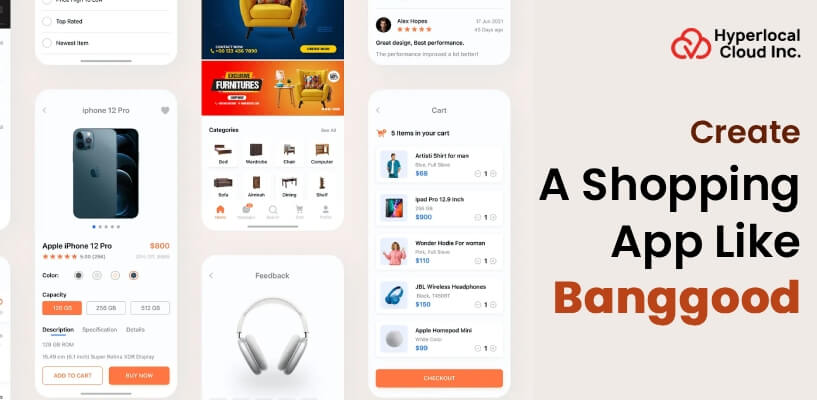
After logging in, users can explore a wide range of products to be had in the app. Products are displayed under excellent categories, which include electronics, style, home items, and accessories. The app additionally offers a search bar wherein users can type product names and discover products easily.
3. Product Details and Selection
When a user clicks a product, the app displays distinctive data, including product images, descriptions, expenses, available colors and sizes, shipping information, and customer reviews. This record allows users to understand the product better before making a buying choice.
4. Cart Management and Checkout Process
The buying cart allows customers to review decisions on products earlier than placing an order. They can change quantities, remove items, or use available discount codes. After confirming the cart, customers proceed to checkout, in which they select a shipping method and payment method.
5. Payment and Order Confirmation
An app like Banggood gives a couple of stable payment alternatives, along with debit cards, credit cards, virtual wallets, and sometimes coins for transport. Once the charge is finished, users obtain an order confirmation message alongside order information.
6. Order Tracking and Delivery Updates
After placing an order, users can track their cargo immediately from the app. The app shows updates that include order processing, shipping, and anticipated transport dates.
5. Customer Support and Feedback System
The app additionally includes customer support functions that permit users to ask questions, and after that, they can simply submit their overall reviews.
List of the Lucrative Benefits of the Banggood Clone App
Learn about the lucrative benefits of the shopping app from users’ and the business’s perspectives. Review the list mentioned below.
Benefits for Users
1. Easy and Comfortable Shopping Experience
Users can shop from anywhere, at any time, on their cell phones. They no longer want to go to brick-and-mortar shops or browse more than one website. Everything they want is to be had in a single app.
2. Wide Range of Products in One Place
The Banggood clone application provides a vast selection of items across several special categories of goods. It also affords users the ability to compare pricing for items, research other choices in addition to those available from the site, and make purchases at a price that is suitable to them and matches their requirements.
3. Attractive Discounts
Users revel in everyday discounts, flash sales, and unique offers via the app. Notifications alert them about rate drops and time-limited offers, assisting them save money.
4. Secure and Multiple Payment Options
The app offers stable fee strategies, giving customers self-confidence while making online payments. Having multiple payment options makes the buying process easier.
5. Order Tracking
Users can manage their orders in real time and know exactly when their products will arrive. This transparency builds trust and improves the overall buying experience.
6. Personalization
This feature allows for a higher degree of relevance and enjoyment in the purchasing process for the user.
Benefits for Businesses
1. Quick Entry into the E-Commerce Market
Developing a Banggood clone app allows agencies to enter the web buying market quickly. Instead of constructing an app from scratch, they could release a ready-made solution with verified functions.
2. Access to a Global Customer Base
A Banggood-like app enables businesses to reach customers from extraordinary areas and nations. This will increase brand visibility and open doors to global sales opportunities.
3. Higher Sales and Revenue Growth
With features like offers, push notifications, and personalised recommendations, businesses can inspire repeat purchases and grow basic income sales.
4. Better Customer Engagement
Businesses can interact with clients through notifications, emails, and in-app messages. This maintains clients’ knowledge about new products and promotions, improving engagement and loyalty.
5. Easy Product and Order Management
The admin panel of a Banggood clone app allows corporations to manage products, prices, orders, customers, and stock from a single location. This simplifies everyday operations and saves time.
6. Scalable and Future-Ready Solution
As the enterprise grows, the app may be updated with new functions and enhancements. This scalability guarantees that the app stays beneficial and competitive ultimately.
Know the Foremost Features of an App Like Banggood
Have an overview of the foremost features and functionalities of the Banggood clone app, which facilitates all three panels: the users panel, the seller panel, and the admin panel.
User Panel
1. Simple Registration and Login
Customers can effortlessly sign on with email addresses, mobile numbers, or social media accounts for an easy transition into using the provider. As soon as a client has signed up and logged into their account, they’ll be able to view their profile, orders placed, and saved settings.
2. Advanced Product Search and Filters
Customers can search through product services by entering key phrases and using filters along with charge range, category, order history, score/reviews, and discounts. This permits clients the opportunity to find precisely what they are seeking without wasting an excessive amount of time.
3. Detailed Product Pages
Each men’s or women’s product web page carries clean photographs of the item, an in-depth description of the product, the price, available sizes, shipping prices, and a couple of customer reviews.
4. Wishlist and Favorites
Additionally, customers can also add items to a “wishlist” for future buy after evaluating products or waiting for any price reductions.
5. Shopping Cart and Easy Checkout
When using the cart feature on the website, customers can see the items in their cart, replace items if necessary, and delete items if desired. The ordinary checkout procedure is simple to follow and supports numerous payment methods, making it short and easy to test out.
6. Order Tracking and Notifications
Customers can track their orders in real time and will receive real-time notifications about their order status; notification of delivery status, notification of new products and/or service promotions; and notification of new products being offered.
7. Customer Support and Reviews
Through the app, customers can reach the customer service department with any questions or concerns regarding orders or product returns. Customers may also submit ratings/reviews once they receive their product to assist other customers in making purchases.
Seller Panel
1. Seller Registration and Verification
Sellers can sign on and provide the desired information for verification. This ensures agreement with quality at the platform.
2. Product Listing and Management
Sellers can add new products, add photos, write descriptions, set fees, and update stock levels. This offers sellers complete control over their product listings.
3. Order and Inventory Management
Sellers can view incoming orders, manage inventory, and update order statuses. This enables them to avoid inventory shortages and delays.
4. Offers and Discount Management
Sellers can create reductions, unique deals, and time-limited offers to attract more customers and enhance income.
5. Sales Reports and Earnings Overview
The supplier dashboard provides reports on sales, profits, and purchaser behavior. This enables dealers to understand performance and plan better techniques.
Admin Panel
1. User and Seller Management
Admins can approve, block, or control customers and sellers. This guarantees the platform stays secure and straightforward.
2. Product and Category Management
Admins can create, edit, or add product categories. They can also review indexed products to ensure that quality requirements are met.
3. Order and Payment Monitoring
Admins can track all orders and payments throughout the platform. This allows for dispute resolution and guarantees smooth transactions.
4. Commission and Revenue Control
The admin can set commission rates for sellers and screen overall earnings. This function supports flexible sales models.
5. App Content and Notification Management
Admins can control banners, promotions, notifications, and app content to keep users engaged.
Launch your Banggood clone faster than you think
The Essential Integrations in Banggood Clone App Development
A list of all the required integrations that are useful to provide advancement to the application is mentioned below.
1. Payment Gateway Integration
Secure payment gateways enable users to pay with credit and debit cards, digital wallets, and other fee strategies. This integration guarantees fast, secure transactions and builds consumer trust.
2. Shipping and Logistics Integration
Shipping APIs assist in calculating transport fees, tracking shipments, and automatically updating delivery statuses. This keeps customers informed and improves shipping performance.
3. Push Notification Integration
Push notifications help organizations send updates on order popularity, rate drops, and new arrivals. This keeps users engaged and encourages repeat purchases.
4. Analytics and Reporting Integration
Analytics tracks a person’s behavior, income traits, and the app’s overall performance. These insights help agencies improve their offerings and marketing strategies.
5. Customer Support Integration
Live chat or help desk gear permits customers to get instant assistance. This improves client pleasure and allows for clear-up issues fast.
6. Social Media Integration
Social media integration permits users to log in without difficulty and share products with friends. This also allows agencies to sell their app organically.
7. Multi-Language and Multi-Currency Integration
This integration supports global users by means of permitting them to view the app in their desired language and foreign currency. It improves people’s experience and increases global reach.
Understand the Unique Approach for Banggood Clone App Development
To develop an app like Banggood, businesses are required to follow the appropriate approach, which helps them to create a robust application. For this, businesses can review the app development steps discussed below to start developing.
1. Market Research
Before development starts, it’s crucial to take a look at current shopping apps like Banggood. This study facilitates becoming aware of famous capabilities, pricing strategies, and personal alternatives.
2. Planning App Features and Panels
At this stage, the capabilities for the consumer, dealer, and admin panels are finalized. Each panel is designed to serve a particular purpose. Proper planning ensures that each one’s vital features are covered and that the app works easily without confusion for users or sellers.
3. UI and UX Design
The app’s layout plays a massive role in attracting and keeping customers. A clean layout, easy navigation, and clear buttons make the app smooth to use. Designers focus on developing a friendly appearance and experience so users can browse products, add items to the cart, and complete purchases without issue.
4. Development
Once the design is ready, the development process begins. The development process involves two main development approaches, of which the direct, ground-level approach is one, and developing the app with a white label solution. Now it’s up to the businesses to specify what type of mobile app solution they are looking for.
5. Third-Party API Integration
To enhance app capability, third-party integrations are incorporated. These encompass payment gateways, transport services, notification gear, and analytics systems. These integrations help automate tasks and enhance overall performance.
6. Testing and QA
Before launching the app, thorough testing is completed. This includes checking for bugs, charge issues, overall performance issues, and safety risks. Testing ensures that the app works properly on exclusive gadgets and operating systems.
7. App Launch and Maintenance
After a successful tryout, the app is launched on app stores. However, the work does not cease there. Regular updates and improvements are essential to keep the app running smoothly and meet changing user desires.
Tech Stacks to Create a Shopping App like Banggood
Create a shopping app like Banggood with the advanced and top-notch technology stacks mentioned in the table below.
| Category | Tech Stack |
| Frontend Development Technologies | React Native or Flutter, HTML, CSS, and JavaScript |
| Backend Development Technologies | Node.js, Python, PHP, Java, or .NET |
| Database Technologies | MySQL, PostgreSQL, or MongoDB |
| Cloud and Hosting Services | AWS, Google Cloud, or Microsoft Azure |
| Payment Gateway Technologies | Stripe, PayPal, and Razorpay |
| Security and Authentication Technologies | SSL Encryption, OAuth, and JWT |
| Analytics and Monitoring Tools | Google Analytics or Firebase Analytics, Crash Reporting Tools |
Explore Who Can Utilize the Banggood Clone App
All the key users of the application are listed in a well-defined manner. All you can do is just check out the information below.
1. Online Shoppers and Everyday Customers
The number one customers of a Banggood clone app are online shoppers. These customers decide to buy products on their mobile phones instead of traveling to physical stores.
2. Small Businesses
Small and medium-sized businesses can greatly benefit from a Banggood clone app. Many local dealers need to promote their products online, but do not have the budget or resources to construct a platform from scratch.
3. Large Retailers
The app lets them showcase their products to a global audience and monitor sales through a centralized dashboard. With functions like bulk product uploads and stock control, huge sellers can handle excessive order volumes efficiently.
4. Drop Shipping and Wholesale Businesses
Drop shipping and wholesale corporations find the Banggood clone apps very useful. These organizations do not continually store products themselves. Instead, they rely on third-party providers to ship products directly to customers.
5. Startups and Entrepreneurs
New marketers seeking to enter the e-commerce market can use a Banggood clone app as a launch platform. Since the app comes with ready-made capabilities, startups can save time and money.
6. International Sellers and Exporters
International dealers who want to attract customers in one-of-a-kind countries can also utilize the Banggood clone app. With multi-language and multi-currency support, the app makes borderless promotion easy.
Request a detailed budget estimate for your shopping app
Understand the Trending Aspect of an App Like Banggood
The Banggood clone app comes with so many trending aspects that make it stand out as a future-ready mobile app. Have a look and get to know how.
1. Growing Popularity of Mobile Shopping
More people are using smartphones for online shopping than ever before. Mobile apps provide faster access, higher performance, and a more customized experience than websites. This shift towards mobile-first purchasing is one of the biggest tendencies using the help of apps like Banggood.
2. Rising Demand for Affordable Global Products
Customers today are seeking out fine products at reasonable prices, even though they arrive from international sellers. Apps like Banggood meet this call by supplying a huge range of lower-priced products from global markets.
3. Personalized Shopping Experience
Modern shoppers opt for apps that understand their pastimes. Banggood-like apps use information to reveal product recommendations, unique offers, and offers based on user behavior.
4. Frequent Discounts and Flash Sales
Flash sales and time restrictions attract a huge number of customers. Apps like Banggood frequently run promotions that create pleasure and urgency amongst customers. This trend allows increased app engagement and sales volume.
5. Improved Logistics and Faster Delivery Options
Advancements in the logistics and delivery era have made worldwide shipping faster and more reliable. Customers now anticipate real-time order monitoring and accurate shipping updates.
6. Trust Built Through Reviews and Ratings
Users agree with apps that offer sincere critiques and ratings. The ability to study consumer feedback before buying a product has become a primary trend. Banggood-like apps inspire transparency, which builds acceptance as true with long-term customer relationships.
7. Strong Focus on App Security and Safe Payments
As online transactions increase, customers are more and more concerned about data security and payment safety. Apps like Banggood observe strict security practices, which reassure users and encourage them to shop confidently.
The Best Ways to Generate Money from the Banggood Clone App
After the development of the application, the main concern of businesses is to generate revenue from the application to increase the ROI. For this, we have shared some of the most relevant strategies that help businesses generate good income from the application.
1. Commission from Sellers
One of the most common ways to earn money with a Banggood clone app is by charging dealers a commission. Every time a supplier makes a sale via the app, the platform owner receives a small percentage of the total order cost.
2. Featured Product and Sponsored Listings
Another powerful way to generate income is through featured product placements. Sellers can pay to spotlight their products on the home screen, top search results, or special deal sections.
3. Subscription Plans for Sellers
The app can provide subscription-based plans to dealers. These plans may also include extra benefits, such as decreased commission rates, access to superior analytics, priority customer service, or the potential to add extra products.
4. In-App Advertising
In-app advertisements are another revenue source. Brands and sellers can place commercials in the app to promote their services or products. These advertisements can take the form of banners, pop-ups, or promotional messages.
5. Delivery and Convenience Charges
The platform can earn cash by adding small transport or service charges to every order. These prices help cover logistics and operational costs whilst contributing to overall sales.
6. Affiliate Marketing Opportunities
A Banggood clone app can also earn through associate partnerships. By selling third-party services or products, the app earns a commission for every successful referral or purchase.
7. Seasonal Sales and Promotional Campaigns
Special sales events, along with festive gifts, flash sales, or time-limited offers, can help improve order volume. During these campaigns, sellers may additionally pay extra for promotions, and better sales lead to improved fee profits for the platform owner.
Bottom Line!
Launching a marketplace like Banggood requires more than replicating a shopping interface. You need a reliable platform that connects customers, sellers, payments, products, orders, and logistics in one seamless ecosystem. Starting with a ready-to-customize Banggood clone can help you reduce development time, control your initial investment, and launch with the essential marketplace functionality already in place. With the right MVP strategy, you can validate your business model first and expand the platform as your customer and seller base grows.
At Hyperlocal Cloud, a Banggood clone app starts at $8,000 and can be customized to match your brand, marketplace model, features, integrations, and target market. Whether you’re launching a new e-commerce startup, expanding an existing retail business, or building a multi-vendor marketplace, our team can help you turn your idea into a scalable solution.

Patt Cummins is an experienced content writer with over 10 years of experience creating clear and engaging content for technology-focused industries. He specializes in simplifying complex technical topics into easy-to-understand stories that educate readers, support brand communication, and help businesses effectively share their solutions.

Need Help With
Development?