


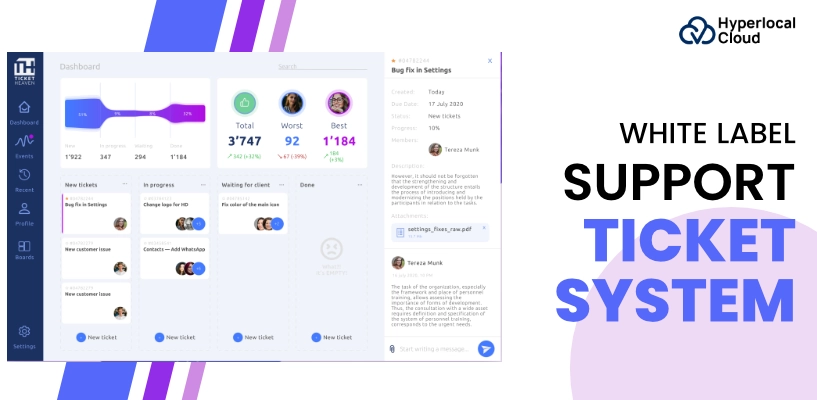
Nowadays, with the massive demand for digitalization, the need for advanced software solutions has increased, which are tailored to corporations or industries. As customers become more vocal about their needs, a digital support ticket system has become a necessity. Support ticketing software is a crucial tool for corporations to manage patron inquiries, technical problems, and service requests. Over the past few years, demand for such platforms has improved substantially as groups are seeking to enhance their customer service experience.
The worldwide marketplace for help ticketing software is growing rapidly, driven by growing demand throughout industries from e-commerce to healthcare. That’s the reason businesses and startups are ready to start their business journey for huge growth by developing their own support ticket system. Let’s explore the blog to get a deeper insight into the software, which is working with advanced features that come with emerging trends, making it a revenue-generating system.
What is a Support Ticket System?
The support ticket system is a digital software that helps industries and organizations to easily handle customer support requests in a timely manner. In simple words, users can raise a ticket by adding their concern and submitting it so that a support agent can analyze and resolve the issue. Thus, the software acts as an all-in-one solution that enables organizations to interact with customers by answering their queries.
Want a ticketing system that reflects your brand?
How Does a Support Ticket System Work?
Operating a support ticket system is quite easy because the platform is designed to give a user-friendly and mobile-friendly experience to users. So, below is a step-by-step guide to operating a platform.
1. Ticket Creation
Users can use the platform to raise a ticket. Users may have to just add their names, the issues they face, and simply submit them via their PC, email, or even phone.
2. Ticket Assignment
Once a ticket is submitted, the assist team is notified, and it’s either robotically or manually assigned to the perfect agent.
3. Ticket Tracking
The ticket is then tracked through distinctive degrees of resolution. This may also contain an initial acknowledgment of receipt, accompanied by further investigation, troubleshooting, and the very last step to resolve the problem.
4. Closure of Ticket
Once the ticket raised by a user is resolved, the support team will close the ticket by sending a notification to the users so that they can also add their relevant comments.
5. Reporting & Analytics
The software generally provides a strong analytics tool that allows groups to monitor key metrics, including response and resolution times, consumer satisfaction, and unusual problems.
The Compelling Advantages of a Support Ticket System
A complete package of advantages that you will get from a support ticket system is discussed in the section below. Just review it once.
1. Streamlined Communication
The software typically centralizes all the communication in a single place, which means no need to move to a different channel to store a communication.
2. Improved Customer Experience
With this, users can raise a ticket and submit the issue at any time and monitor it in real time. Thus, this approach builds a sense of being valued among users, which is helpful to enhance their experience.
3. Faster Response Times
Since support tickets are prioritized based on urgency, the support team can deal with the most urgent problems first. This leads to quicker reaction instances and an extra green guide procedure.
4. Better Collaboration
Support groups can collaborate more effectively through ticketing structures. With shared access to tickets, marketers can effortlessly pass statistics between departments or team members.
5. Comprehensive Reporting
Support ticket systems consist of built-in analytics and reporting features that enable groups to display key performance indicators.
6. Automation
The ticket systems for support offer automation functions such as automatically assigning tickets to the precise dealers or sending automatic acknowledgments to clients.
7. Knowledge Base
Many platforms consist of a self-provider expertise base that allows clients to remedy commonplace issues independently, lowering support tickets and freeing the team to focus on more complex problems.
Reasons Why You Should Invest In White Label Solutions
There are so many compelling pros that businesses will get from investing in a white label solution for the development of a support ticket system. Just have a look below to get to know the reasons why you should invest in a white label solution.
| Compelling Reasons | Description |
| Faster Time-to-Market | Launch products quickly without building from scratch. |
| Lower Development Costs | Save money by leveraging ready-made solutions. |
| Instant Brand Expansion | Offer more services under your own brand effortlessly. |
| Reduced Technical Burden | Skip complex development and ongoing maintenance. |
| Scalability | Grow your offerings easily as your business expands. |
| Expert-Backed Quality | Benefit from solutions built and updated by specialists. |
| Higher Profitability | Earn more by reselling proven products with minimal overhead. |
| Competitive Advantage | Stay ahead by rapidly adapting to market trends. |
| Focus on Core Business | Free up time to concentrate on sales, marketing, and strategy. |
| Lower Risk | Invest in established, market-tested solutions rather than unproven ideas. |
Transform Your Support Workflow with a Click
Exciting Features of a Support Ticket System
Just have a look at the list of exciting features of a support ticket system below to integrate these features to facilitate a wide range of users.
1. Multi-Channel Support
Support ticket platforms regularly integrate with various conversation channels, together with email, live chat, social media platforms, and SMS. This guarantees that customers can attain guidance in the way that is most convenient for them.
2. Ticket Prioritization & Categorization
Tickets can be categorized by means of difficulty type and assigned a concern degree. This guarantees that urgent issues are addressed at once and that much less critical worries are handled as well.
3. Service Level Agreement Tracking
An SLA is a commitment to solve problems within a particular time frame. Support ticket structures frequently allow companies to set SLAs for distinctive support ticket sorts and monitor whether or not the group is assembling them.
4. Customizable Ticket Forms
Many ticketing structures allow corporations to create custom ticket submission bureaucracies that capture all vital customer information. This facilitates dealers in recognizing the problem faster and reduces the need for follow-up questions.
5. Automated Workflow
Automated responses acknowledge receipt of a ticket and set expectations for resolution times. Additionally, automatic workflows can ensure that tickets are assigned to the right crew participants based on defined policies.
6. Knowledge Base Integration
Many platforms encompass an understanding base feature that stores common questions and solutions. This enables customers to locate answers without submitting a ticket and presents support marketers with smooth access to relevant assets.
7. Reporting & Analytics
Detailed reports give groups the records they want to monitor performance, discover traits, and optimize their customer service techniques.
The AI-driven Integrations in the Support Ticket System
A wide range of AI-driven technologies is used to build a high-quality support ticket software system. All the advanced features for the same are discussed below.
1. AI Chatbots
With the help of an AI-driven chatbot, the users’ queries will be resolved automatically through the AI agent. This will reduce the need for manual agents with the decrease in workload.
2. Predictive Ticket Routing
AI can expect which guide agent is most acceptable to deal with a specific support ticket based on elements like the agent’s past performance, expertise, and current workload. This improves the speed and accuracy of ticket assignment.
3. Examine the Sentiment
This feature easily examines users’ sentiments by just reviewing their tickets. So it will let the support agents understand the user’s mood accordingly.
4. Automatic Ticket Categorization
AI algorithms can robotically categorize and tag tickets based on their content, allowing support teams to quickly deal with the most pressing troubles.
5. AI-Powered Knowledge Base
AI can analyze support ticket statistics and suggest applicable expertise-based articles to help solve customer troubles faster.
The Development Approach for the Support Ticket System
Just have a look at the steps that play an essential role in the development of a support ticket system software that you can also implement in your business.
1. Requirement Gathering
The first step is to outline the desires of the commercial enterprise and its customers. This entails knowing the styles of assist tickets to be treated, the preferred capabilities, and the integration with existing structures.
2. UI/UX Design
The user interface and user experience must be intuitive and user-friendly. The intention is to make the ticket submission and resolution process as seamless as possible for both clients and assist supporters.
3. Development Phase
The backend infrastructure needs to support the gadget’s core capability, including ticket advent, management, and conversation. It needs to be scalable, secure, and capable of dealing with high volumes of aid tickets. However, after this, the main aspect is the development approach that depends on the businesses. They must select between developing the software from scratch or simply utilizing a white label solution for the development. Both methods are reliable and provide efficient results; however, the differentiation comes in the development cost and deployment time.
4. Integrations
Modern software wants to integrate with different structures, consisting of CRM, live chat, email, and social media channels. These integrations permit businesses to offer multi-channel aid and keep all customer communications within a single, unified platform.
5. Testing & QA
After the software is evolved, thorough testing is crucial to ensure that the entirety works as predicted. This consists of trying out all functions, integrations, and security protocols. A virus-free system is critical to maintaining a clean workflow and customer trust.
6. Deployment
Once the system is examined and ready, it is deployed to production environments. In this case, help teams receive training to apply the new updates efficiently.
7. A Regular Improvement
Support ticket systems have to continue to be static. Regular updates, including new capabilities, protection patches, and performance enhancements, will keep it efficient and responsive.
Tech Stacks to Build a Support Ticket System
All the tech stacks that are used to build a support ticket system are listed in the table below. Just check it out and utilize it in your business accordingly.
| Category | Tech Stack |
| Frontend Technologies | HTML/CSS/JavaScript, React.js, or Angular, Vue.js |
| Backend Technologies | Node.js, Python (Django/Flask), Ruby on Rails, PHP (Laravel) |
| Databases | MySQL/PostgreSQL, MongoDB |
| Cloud & Hosting Services | Amazon Web Services (AWS), Google Cloud Platform (GCP), Microsoft Azure |
| APIs and Integrations | Zapier, Twilio, Intercom/Freshchat |
| Security | OAuth 2.0, SSL/TLS Encryption, Two-Factor Authentication (2FA) |
Build a Stronger Brand Identity with Our White-Label Ticket System
For Whom is a Support Ticket System?
A software for support tickets is quite versatile, enabling several industries to rely on it. The information below lets you know clearly who can utilize the software solution.
1. E-commerce Businesses
Online stores deal with a great extent of customer inquiries, ranging from order problems to product returns. The software for support tickets enables e-commerce groups to efficiently track customer requests and offer brief resolutions.
2. Software Companies
Software organizations regularly offer technical guides for his or her products. Support ticket platforms help them handle complicated issues, bugs, and feature requests from clients while additionally improving communication among development and aid teams.
3. Healthcare Providers
Hospitals, clinics, and healthcare carrier vendors use the support ticket system software to manage patient inquiries, appointment requests, billing troubles, and coverage claims.
4. Financial Institutions
Banks and financial services businesses need a steady way to address customer service for account inquiries, mortgage processing, and transaction problems.
5. For Telecommunications
Telecom carriers frequently cope with technical problems, including service outages, community troubles, and billing inquiries.
6. For Educational Institutions
Schools, universities, and online training systems use help ticket structures to handle student inquiries, technical problems with online learning platforms, and administrative requests.
7. IT Companies
Companies that provide IT offerings or tech help depend closely on help desk ticket management software to manage incoming customer requests and technical problems from clients.
8. Government Organizations
Public sector companies use ticketing structures to track public provider requests, complaints, and comments. These systems ensure transparency and improve citizen offerings.
The Top-Notch Trends of the Support Ticket System
A support ticket system is rapidly becoming popular in the market due to its top-notch functionalities. That’s why all the latest trends in software are mentioned below.
1. AI & Machine Learning
AI-powered functions are getting more commonplace in software. Machine learning improves accuracy over time, accelerating ticket decisions and enhancing effectiveness.
2. Omnichannel Support
Customers assume to reach groups through more than one verbal exchange channel, permitting agencies to satisfy customer expectations for seamless providers across platforms.
3. Self-Service Portals
Customers can regularly find the solutions they need without submitting a ticket, reducing guide request quantity and empowering them to clear up problems independently.
4. Workflow Optimization
Automation functions are making guide groups more efficient by automatically routing tickets, providing predefined responses, or escalating issues based on predefined rules.
5. Cloud-Based Ticketing Systems
These systems permit organizations to get access to their support records from everywhere and ensure that updates and improvements can be rolled out seamlessly.
6. Proactive Support
Proactive help can consist of automatic alerts to customers or outreach earlier than provider interruptions occur.
7. Mobile Support Ticketing
With the growing dependency on mobile applications, more customers and sales representatives are using mobile apps to manage tickets. This enables faster responses and enhances the overall customer experience by using a cross-platform presentation guide.
8. Integration with CRM Systems
This integration provides a 360-degree view of the customer, permitting support retailers to resolve issues more correctly at the same time as retaining a high degree of personalization.
Revenue Generation Strategies for Support Ticket System Software
Get to know about the revenue generation strategies by reviewing the information mentioned below. Businesses can follow these strategies in order to increase their overall ROI.
1. Subscription-Based Model
Many support ticket systems are offered on a subscription model, where businesses pay a recurring fee based on the number of users, support tickets, or advanced features.
2. Offer Premium Features
Offering additional features as part of premium plans is a common strategy; these features can be priced at a higher price point to drive revenue.
3. Additional Add-Ons
Support ticket system providers can offer add-ons, integrations with other platforms, and advanced customization options for an extra fee.
4. White-Label Solutions
Some businesses choose to offer white-label support ticket systems. This allows other companies to brand the software as their own and charge for it while paying a licensing fee to the original provider.
5. Consulting and Training Services
Some software companies also generate revenue by providing consulting services to help businesses optimize their ticketing processes. Training courses for support teams on effective system use can also serve as a valuable revenue stream.
Get the Expertise of Hyperlocal Cloud Now!
Partner with Hyperlocal Cloud to develop a support ticket system with the latest technologies to stand out among your competitors. We have years of experience in providing AI app solutions for entrepreneurs so that they can enjoy massive business growth with a trusted user base. You can completely rely on our mobile app development solution, because we serve our clients worldwide with the best. Contact us and give us a chance to fulfill your business needs with our tech expertise.

Patt Cummins is an experienced content writer with over 10 years of experience creating clear and engaging content for technology-focused industries. He specializes in simplifying complex technical topics into easy-to-understand stories that educate readers, support brand communication, and help businesses effectively share their solutions.

Need Help With
Development?