


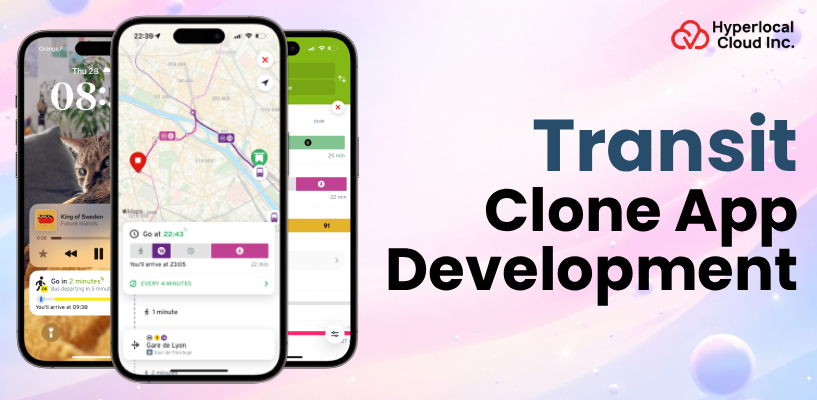
The Transit app transformed the way people move around cities by integrating the real-time tracking of buses, trains, multi-model routing, and live navigation in one easy experience. It has set the standard of what commuters require in terms of technology in the transport industry.
The market is accelerating in 2026; the number of smart city investments is increasing, GFTS data is more widely available than ever, and users want one app to cover all modes of transportation. This is the right time for businesses to invest. Competition is less than in the ride-hailing industry, the development costs are lower, and the revenues have a high potential due to the municipal contracts, advertising, and data licensing.
Exploring The Transit Mobile Application
Transit app is a transport utility that assists passengers in planning their route, following trains and buses in real-time, and navigating their way in and out of the office. It draws statistics of local transit agencies to display live arrival, route choices, and service notifications all on a single platform. The users may also compare different means of transportation, such as buses, subways, bikes, and scooters, in order to use the quickest or most affordable method to move around.
Launch Your Transit App Before the Market Gets Crowded
The Working Mechanism of a Transit Clone App
The following is how the Transit app functions in order to provide a smooth ride.
1. Pulls Real-Time Data From Transit Agencies
The application is associated with GTFS and GTFS-realtime feeds, which are supplied by local transportation agencies. This gives it real-time vehicle positions, updated schedules, and service delays in the process.
2. Plans Multi-Modal Routes
After a rider gets to a destination, the app will identify the best route to be used among buses, subways, bikes, and scooters. It considers the cost, transfers and travel time to offer the smartest ones.
3. Tracks Vehicles in Real Time
Transit vehicles have live GPS data that is shown on an interactive map. The riders will be in a position to know the exact position of their bus or train and the number of minutes it will take to reach their destination.
4. Sends Smart Notifications
The application also keeps the riders informed of the delays, disruptions of services, and how much time it would take them to get to their destination. Push notifications will enable commuters to be notified without even having to look at the screen.
5. Guides Riders With Step-by-Step Navigation
When one is already on a trip, the app will give walking directions to the stop, boarding instructions, transfer instructions, and a reminder to exit at the appropriate station.
Why Entrepreneurs Are Investing in a Transit Clone App
A Transit clone is currently one of the most feasible projects in the mobility technology industry due to its low barriers to entry and high long-term potential.
| Benefits | Description |
| Low Competition With High Demand | The market of ride-hailing app is oversaturated, and the apps of public transit are still open. Reduced number of players implies reduced cost of acquiring customers as well as increased space to expand. |
| Multiple Revenue Streams | You do not have to make money in just one manner. A Transit clone can make a living by using in-app advertisements, premium plans, data sales, and white-label deals with transit organizations. |
| Lower Development Costs | In comparison with Uber clones, you do not have to onboard drivers, manage vehicles, or have surge pricing systems. Public GTFS data is free, which reduces your development budget by a huge margin. |
| Strong Government Partnership Opportunities | Numerous cities in the US require online transport booking apps, but do not have the funds to construct their own. The Transit clone in white label presents them with a readily available solution that they will gladly pay for. |
| Built-In Scalability Across Cities | When your app has been tested in one city, it is easy to expand. You simply plug in the GTFS feed of a new transportation agency and open in that market without having to reconstruct anything. |
| Alignment With Sustainability Trends | Consumers and governments are driving towards the use of greener transportation. An app that aids in the reduction of emissions created by public transit helps obtain grants, publicity, and popularization. |
Create a Powerful Transit App and Lead the Market
Important Features of Public Transport App Like Transit
The following are the features that your Transit clone app should have to make an entry in the US market and provide a smooth experience to all types of users.
Passenger Panel Features
1. Real-Time Vehicle Tracking
Live bus and train locations are available on an interactive map to the riders. No guesses anymore, they are aware of the time when their ride is coming.
2. Multi-Modal Trip Planning
The application uses the most favorable path through buses, subways, bikes, scooters, and walking. Riders have various choices in terms of time, price, and convenience.
3. Step-by-Step Navigation
The application shows riders all the steps, including the process of walking to the stop and alighting at the correct station. There are turn-by-turn directions and transfer alerts that ensure that they are on the right track.
4. Favorites and Saved Routes
Commuters can store their daily destinations and frequent destinations in a format in which they only have to tap once. This reduces the amount of time spent in planning normal trips to zero.
5. Push Notifications and Alerts
There is also the relaying of real-time information on delays, cancellations, and route changes in the application. One does not have to have the app open at all times to keep the riders posted.
6. Fare Estimation and Ticketing
Riders are able to see the cost of fares in advance and buy mobile tickets in the app itself. There is no necessity to carry cash or a separate transit card.
7. Crowdsourced Occupancy Reports
The passengers are able to report on the congestion of a bus or a train in real time. This will assist other riders in making decisions on whether to wait or not to wait until the next one arrives, or get a new route.
8. Offline Schedule Access
The schedules are downloaded, allowing riders to plan their trips even when they are not on the internet. This is necessary in underground stations and tunnels, and places with poor connectivity.
9. Accessibility Features
The application is usable by everyone as it is wheelchair-friendly, with elevator status, and accessible car alerts. Inclusive design is not a luxury but an expected situation.
10. Commute Analytics Dashboard
The riders can view their history of past travels, their average commuting period, the amount of carbon they save, and compare the price to that of driving. It converts the information from day to day into useful personal information.
Admin Panel Features
1. Route and Schedule Management
The admins are able to add, edit, or delete routes and schedules via a simple dashboard. Any changes are immediately reflected on the app without any form of coding involved.
2. GTFS Data Import Tool
One of the drag-and-drop tools allows admins to upload both GTFS Static and GTFS-Realtime feeds within minutes. This facilitates onboarding a new transit agency in a fast and hassle-free manner.
3. Ridership Analytics Dashboard
Popular routes, peak travel times, demographics of riders, and volume of trips are demonstrated in detailed reports. Such information assists the agencies in making wiser planning and budget choices.
4. Service Alert Manager
The admins are able to generate and distribute real-time service alerts about delays, detours, and cancellations. Riders are informed immediately to make alterations to their plans.
5. User Management System
A centralized panel to monitor, view, and support registered users. Admins are able to process account issues, feedback, and support tickets at a single location.
6. Fare Configuration Tool
The admins are able to establish and modify fare structure, zone-based pricing, and discount rules on the panel itself. Pricing changes did not require any developer intervention.
7. Heat Map Visualization
The visual heat maps indicate the areas where the demand by riders is greatest in the city. This assists agencies in enhancing routes, capacity, and the elimination of overcrowding at busy lines.
8. Push Notification Manager
The admins can set and deliver specific messages to individual groups of users or the whole base of riders in the form of a push notification. Good in terms of planned maintenance, holiday schedules, and promotion.
9. Feedback and Rating System
It has an in-built module that gathers rider feedback and ratings on routes, vehicles, and overall experience. This provides the agencies with first-hand information on what is desired by the riders to be improved.
Driver or Operator Panel Features
1. Real-Time Route Assignment
The routes, schedules, and stop sequences are provided directly on the devices of the drivers. No manual or paperwork coordination was necessary at the beginning of a shift.
2. GPS-Based Live Tracking
The panel transmits the live location of the driver to the backend system and rider app. That is what drives the real-time vehicle tracking that is used by passengers.
3. Schedule and Shift Management
Drivers are able to see their future shifts, swap requests, and schedule changes at a single point. It eliminates telephone back-and-forth calls in organizing operations.
4. Passenger Count Reporting
The counts of boarding and alighting by drivers can be recorded either manually or by electronic sensors. This information is a feeding point to the ridership analytics of the admin panel.
5. Incident and Delay Reporting
In case of a breakdown, accident, or any unexpected delay, drivers will be able to notify it in real time via the app. The system automatically sends out service alerts to the affected riders.
6. Turn-by-Turn Route Navigation
The in-built navigation will direct the motorists through the prescribed path with easy instructions. It comes in particularly handy during times of detour or when the driver is new.
7. Communication Channel With Dispatch
A dispatch or control center is linked to the drivers through a direct messaging or voice feature. Fast communication will facilitate the solution to the on-road problems.
8. Trip History and Log
Each trip made is recorded together with timestamps, stop information, and route information. Drivers and managers will be able to check past trips to track the performance and compliance.
9. Emergency Alert Button
The SOS feature is one tap and allows drivers to contact the control center in case of an emergency. It shows the driver’s real-time position and instantly activates the agency’s emergency response.
10. Performance and Earnings Dashboard
Drivers are able to monitor their completed shifts, total hours, on-time performance, and incentive earnings. Openness encourages drivers and minimizes conflicts.
Start Building a Scalable Public Transport App Today
AI-Driven Enhancements for Transportation App Like Transit
The following are AI-based functions that will transform your Transit clone application into an intelligent, faster, and more useful tool than a plain schedule viewer.
| AI-Driven Features | Description |
| AI-Powered Arrival Predictions | Machine learning algorithms are based on historical and real-time analysis, which can better forecast the arrival of a bus or train than a fixed schedule. The system becomes intelligent with time since it learns the traffic patterns, weather, and ridership trends. |
| Intelligent Route Optimization | AI considers several possibilities of routes in real time and suggests the quickest or the cheapest route. It takes into consideration live traffic, delays, crowding, and even walking pace to customize any trip recommendations. |
| Predictive Demand Forecasting | The application makes use of AI to forecast the demand of riders in terms of route, time of the day, and season. This type of prediction can assist the transit agencies in adjusting the schedules, adding more vehicles, and reducing the waiting time until they are overcrowded. |
| Smart Notifications With Context Awareness | AI notifications are not generic, but they are sent depending on the habits, location, and the status of the rider’s trip. In case your regular bus is late, the app will automatically recommend an alternative to you even before you request. |
| Natural Language Search and Voice Commands | Riders can type or speak their queries, such as the fastest way to downtown right now, and the app gets the meaning. Natural language processing based on AI eliminates the practice of manually entering stops/routes or route numbers. |
| Anomaly Detection for Service Disruptions | AI keeps track of live stream data feeds and automatically identifies suspicious behavior such as unexpected delays, route deviations, or lost vehicles. It notifies the administration panel about the problems and warns the impacted riders before the problem gets out of hand. |
| Personalized Commute Insights | The application tracks the routine of every rider and provides them with personal recommendations, such as improved departure times or less busy options. With time, it becomes their own travel assistant, which learns the way a person travels. |
Step-by-Step Transit Clone App Development Process
It is a well-organized development cycle that can turn an app into one that becomes popular and successful, and one that becomes a waste of budget with no release at all – and by doing this, you create apps without any fear of failure, but out of a planned process.
1. Market Research and City Selection
The given instructions may be followed by the following steps: first, choose your target city or the metro area, and learn the local transit environment. Through existing apps analysis, rider pain analysis, existing GTFS data analysis, and competitor analysis in that particular market. This study informs all your future decisions, including feature decisions, launch strategy, and partnerships.
2. Define Your MVP Feature Set
Write down all the features you desire, and narrow it down to what absolutely will be necessary on day one for the riders. What your MVP must consist of is real-time arrival, simple trip planning, and an interactive transit map, no more. Starting lean will help you arrive at market quicker, save on budget, and build upon real rider reviews rather than assumptions.
3. UI/UX Design and Prototyping
Create a transparent and user-friendly interface that all commuters will learn to use. Create prototypes that are clickable and test with real riders in order to find usability problems before the first line of code is written. Focus on speed, access, and one-handed mobile use. Riders are frequently scrolling through your application when walking or standing on a bus.
4. Transit Clone App Development
To create an app like Transit, you need to choose between a custom-built solution and a white-label option. A custom-built approach involves developing the app from scratch, which requires significant time, effort, and resources. On the other hand, a white-label transportation management solution allows you to launch your platform in as little as seven days. It is easier to rebrand, as you can quickly apply your own name, colors, and theme, and it typically requires a lower investment compared to building a custom solution.
5. Launch, Partner, and Scale
Launch in the App Store and Google Play and initiate outreach to local transit agencies to share data or enter into white-label agreements. Make the first wave of downloads using city-specific SEO, social media campaigns, and transit community involvement. You can now repeat this in other markets by connecting to their GTFS feeds after making your first city stable and growing.
Revenue Generation Techniques for Transit Clone App
The best thing about these revenue models is that they scale with the number of users you have; the more riders, the more each of the revenue channels multiplies, but does not significantly add to your cost base.
1. White-Label Licensing to Transit Agencies
Provide cities and transit agencies with a branded edition of your app on a SaaS deal (monthly or yearly). A lot of smaller agencies are ready to pay relatively small recurring fees and have a ready-made solution instead of creating one by themselves.
2. In-App Advertising
Display advertisements to local companies such as restaurants, cafes, and stores around transit stations. Advertisers are charging high since they will be targeting riders who are physically near their location and are willing to walk in.
3. Premium Subscription Plans
Seize subscribers by charging them a low monthly fee that includes ad-free service, route comparison feature, commute analysis, and priority customer services. A subscription plan among thousands of people who use it every day will result in huge recurring revenue.
4. Data Licensing and Analytics
Sell anonymized and aggregated ridership information to urban planners, real estate developers, and retail chains with the new location of interest. The transit usage habits are a great source of intelligence that various industries are ready to pay to obtain.
5. Affiliate and Integration Commissions
You can make a commission each time a rider makes a scooter, bike-share, or ride-hail reservation using your multi-modal integration in the app. You become the access point to the last-mile transport providers who would like to get access to your active rider base.
Take the First Step Toward Your Own Transit App Success
Ending Words!
The market of public transit applications is booming, and 2026 is the best year to launch your own Transit clone. The opportunity is evident with open GTFS data, increasing smart city investments, and millions of riders seeking more useful tools. Hyperlocal Cloud is one of the on-demand app development companies in the development of clone apps with power and at affordable rates, starting at $8,000. Since Transit clones to ride-hailing, we provide full-end development with the characteristics and scalability your business requires. Are you about to develop your Transit clone application? Get in touch with us and receive a complimentary consultation today to bring your idea to life.

Patt Cummins is an experienced content writer with over 10 years of experience creating clear and engaging content for technology-focused industries. He specializes in simplifying complex technical topics into easy-to-understand stories that educate readers, support brand communication, and help businesses effectively share their solutions.

Need Help With
Development?