

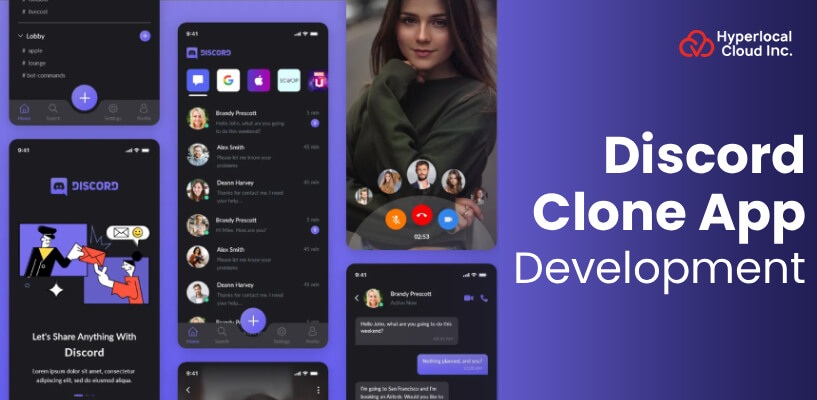
In the last decade, Discord has evolved from a gamers-only voice chat service into one of the world’s most versatile communication platforms. It didn’t take long for the world to embrace what was initially just a simple voice chat solution for gamers. The number of users has now grown to 200 million, and they all want to gather in virtual places that really feel like their homes.
Users are not merely utilizing Discord; it has become their habitat, where they create communities in which conversations can be conducted seamlessly via text, voice, or video without interruption.
What this means for businesses is that there is a great potential to leverage and reap considerable benefits. Investing in platforms like Discord will lead to the winning of the future of community-driven commerce, customer engagement, and team collaboration wrapped into one ecosystem.
Everything You Need To Know About Discord
Discord is an application that allows communication in the form of text, voice, or video. Using the app, users may send private direct messages or join public or private group servers. While it was a tool mainly for gamers, now it is used by communities of all kinds, such as friends, family, hobbyists, students, and professional groups.
Launch Your Own Discord Clone in Record Time
How The Discord Clone App Functions
The steps below explain in detail the working process of a chatting app like Discord:
1. Sign Up/Log In
The desktop app, web browser, or mobile app can be used by a user, and they can create a new account or use the login option if an account already exists. The process is extremely fast and easy, which requires an email and a password to execute.
2. Join or Create a Server
Users have the option of joining the existing servers by means of invite links that are shared by friends or through the server discovery feature of the Discord clone for public communities. In addition, users can create their own custom server from the beginning to have a community that is focused on their particular interests or purposes.
3. Navigate Channels
After logging in to a server, the user looks through the ordered list of channels on the left side of the screen and selects the specific topics or activities. Channels are not only distinctly labeled but also further divided into categories, making it very easy to find discussions appropriate to them.
4. Communicate
Users can simply type messages in the bottom text box and press Enter to send. These chats also support images, GIFs, emojis, and files. In the case of voice chat, one only needs to press a voice channel and be connected instantly to others without the need to set up or initiate the call.
5. Customize
The users are enabled to make their experience more comfortable by managing their profile settings, avatar, status, and about from the user settings menu. Besides that, they are allowed to take charge of their privacy, determine the notification levels for a particular channel or for the whole server, and make their experience consistent with their tastes.
How Discord Clone App Enhances Communication
The chat app, like Discord, offers several benefits to its users. Let’s discuss some of them:
1. Organized Communication
The app offers an option that allows a separate text and voice channel to be created to make discussions hierarchical by subject matter or activity, and this makes it easy to ensure discussions remain focused and accessible.
2. Real-time Interaction
Provides voice and video calls, live streaming, and screen sharing to support instantaneous communication and facilitate effortless collaboration and participation in real time.
3. Direct Messaging
A clean and organized system of one-on-one or group communication that keeps the privacy of communication uncluttered and readily manageable.
4. Community Building
Users can use it to create and organize communities based on their interests, including gaming, hobbies, and build learning communities, mentoring communities, and communities where they can connect with others who share common interests with them.
5. Rich Media Support
The support of text formatting, GIFs, emojis, and sharing images makes the communication process more engaging and interesting to all members.
6. Customizable Servers
Servers are highly customizable, featuring unique emojis, roles, and notification settings, which allow users to be in full control of the appearance of their community.
7. Bots and Automation
Add bots to a server to automate, add games, and control the community, lessening the manual work and improving the experience of the members.
8. Large Server Capacity
With a lot of options on how to organize the members, large servers allow hosting many members of any community size.
Essential Features That The Chat App Like Discord Offers
The table below shows the features of the chat app that Discord offers to its users and admins:
| Features | Description |
| Voice, Video, and Text Chat | Users will be able to engage in real-time communications using high-quality voice, video, and text either in a server or via a direct message between users. |
| Screen Sharing | Users can use this feature and share the screen to stream games, work presentations, tutorials, or other materials with individuals or groups. |
| Persistent Chat | Servers have permanent chat rooms that act as permanent meeting points where communities can come together and converse, as well as record the history of conversations. |
| Direct Messaging | Users are also able to send personal or group messages without using servers to have a one-on-one or group conversation and share files. |
| Customizable Servers | Administrators are able to customize servers with full capabilities such as custom roles, orderly channels, permission controls, emojis, and bot integrations. |
| Community Roles and Monetization | Administrators have the ability to create roles of communication levels and provide superior benefits with paid subscriptions, such as access to exclusive content and benefits. |
| Server Templates | Discord clone provides users with templates to build servers within seconds, including popular templates such as a gaming clan, study group, or community. |
| Forum and Stage Channels | Forum channels allow organized discussion of topics, and stage channels provide speakers and participants of an event in real time. |
| Cross-Platform Availability | The Discord clone application can work with desktop (Windows, macOS, Linux), mobile (iOS, Android), and web browsers. It maintains the chats on all platforms. |
| Accessibility Options | The app is equipped with user disability features as well, like screen reader support, keyboard navigation, and text size change. |
| Streamer Mode | This feature is part of the autopilot, which conceals sensitive details of a user, such as email addresses and notifications, to ensure that the users are not exposed to anxieties during live-streaming. |
| Privacy | Conversations are not stored publicly on the servers, and users have the ability to send direct messages to others via their privacy settings. |
| Two-Factor Authentication | Account security is provided by means of optional two-factor authentication, whereby a verification code supplements password use to gain access. |
Get a Free Quote for Your Chat App Project
How Discord Clone Uses Artificial Intelligence To Enhance Communication
In this section, we will discuss some of the advanced features that you can incorporate to create an app like Discord to make it unique in the market.
1. Clyde Chatbot
The bot is anchored on the OpenAI technology and can respond to questions and engage in lengthy and natural conversations with users. It is able to create discussion threads by default, and it can even propose individual playlists depending on the user’s taste. Clyde is an intelligent bot that contributes to the communication of visitors on the servers in a Discord clone.
2. AutoMod AI
It is an advanced moderation system that has the ability to understand the context of the discussion rather than marking keywords. It helps the server moderators to identify actual violations of the rules more effectively by examining the intent and meaning. AutoMod AI minimizes false positives and identifies problematic behavior that conventional filters would miss.
3. Conversation Summaries
This is among the features that save time and involve AI to produce organized topics and themes using related messages. It allows individuals to become familiar with the conversation they could not have received otherwise, without having to scroll through thousands of messages. Busy server members can use it to remain updated without going through the backlog and getting frustrated by this process.
4. Avatar Remixing
The Discord clone uses generative AI, which allows users to remix and create funny variations of their friends’ avatars. They can add creative elements such as accessories, crowns, or effects to profile pictures by giving a simple prompt. This feature enhances the user’s social experience by providing them with personalization and playful creativity.
5. AI for Community Insights
Special AI bots are able to read user interactions, patterns of engagement, and conversation trends within your server. They can give the owners of the server relevant information about community dynamics, busiest times, and what the members like most. The insights enable moderators to make informed judgments to enhance community health and participation.
Complete Workflow For Creating And Deploying A Discord Clone App
The following is the workflow that businesses should adhere to in order to create a Discord clone app:
1. Define Objectives and Target Audience
The initial and, in fact, the most crucial thing is to define the central theme of the app through market research. Determine the target audience for which your app will be made. Understand what users are looking for, their needs, problems, etc. Check the features that the competition is providing, find the gaps and opportunities in the market to be different.
2. Design the User Interface (UI) and User Experience (UX)
Develop the app that is attractive and easy to use, with emphasis on user-friendly design and visual attractiveness. The latter is basically done by first wireframing the ideas, then creating the interactive prototypes, and finally focusing on simple, easily navigable, user-friendly applications.
3. Develop the App
Decide between two alternatives: a custom-based solution or a white-label solution. In case you opt for a custom-based solution, development of the app from scratch is implied, and therefore, it will take more time and require a higher investment. On the contrary, if you select a white-label solution, it is a ready-made solution, and thus, it will take no more than a week or two to launch the app. The investment is minimal, and the solution is also pre-tested by the testing team for your convenience. According to your brand colors, logo, etc., you can personalize the app.
4. Conduct Rigorous Testing
It should be an extensive quality assurance testing of the app’s performance in different situations with the aim of finding bugs and thereby eliminating them. Apart from that, the functionalities of the app should be verified on different platforms, devices, and screen sizes to ensure that the app works similarly in all places.
5. Implement Security and Privacy
Security and privacy mechanisms ought to be the main features of the framework of your software application rather than something that is simply attached. Besides this, be certain that you are abiding by the proper data privacy regulations, such as GDPR, CCPA, or the corresponding local laws, so that the users’ data are kept safe.
6. Deploy the Application
Launch your app to the market through the appropriate distribution channels, such as app stores, web hosting, or enterprise distributions. It involves setting up secure servers, offering a unique domain name, and infrastructure-related equipment that is capable of handling the expected traffic.
7. Monitor and Optimize
Once you start keeping a check on the performance of the apps, user behavior, and feedback, also keep a check on the improvement spots that you can find out from the data. Actually, with regular updates, you are able to solve issues, bring new features, and also make your app faster and more resilient, which is in line with the live usage.
Technology Frameworks Used In Building The Discord Clone App
The following table shows the technologies used in developing a messaging app:
| Component | Technology | Purpose |
| Frontend | React, React Native | Web and mobile app interfaces |
| Backend | Python, Elixir, Rust | Server-side logic and API services |
| Database | Cassandra, MongoDB | Data storage and management |
| Real-time Communication | WebRTC, WebSockets | Voice, video, and live messaging |
| Cloud Infrastructure | Google Cloud Platform | Hosting and scalability |
| API Integration | RESTful APIs, GraphQL | Third-party service connections |
| Payment Processing | Stripe, PayPal | Subscription and transaction handling |
| Notifications | Firebase Cloud Messaging, APNs | Push notifications for mobile and web |
Supercharge Your Business With a Discord-Style Platform
Ways Discord Clone Earns Money Using Its Monetization Structure
The following are the ways that businesses or startups can use to earn money through the Discord clone:
1. Freemium Model
Discord clone keeps the main features free of charge to everyone. The features include unlimited messaging, voice/video calls, and server creation for all users.
2. Subscription Model
It is a set of premium features like increased upload capacity, custom emojis, high-resolution video streaming, and server boosters. Enhanced app functionality and personalization options are offered on a monthly or yearly basis, and users are charged for them.
3. Server Boosting
Users are able to buy server boosts in order to unlock features for whole communities, like better audio quality, more emoji slots, custom server banners, and a better streaming resolution.
4. Nitro Basic Tier
A subscription level that offers the necessary high-quality features, such as increased file uploads and custom emojis on all servers, but charges less. This option will attract price-sensitive users who are willing to spend a bit more for a premium, but not the complete Nitro package.
5. Avatar Decorations and Profile Customization
A Discord clone also allows users to buy cosmetic items, such as animated avatar frames, profile effects, and exclusive decorations, to customize their presence on the app. Microtransactions of this kind give users the opportunity to be different and thus make more money for the app.
6. Merchandise and Partnerships
Discord clone sells branded merch and creates partnerships with gaming companies, content creators, and brands through promotional partnerships. Such contracts become a new revenue stream for the company besides subscription services and help to position the app as a brand further.
In A Nutshell!
Creating a chat app like Discord is a task that cannot be approached in a one-dimensional manner and involves both the technical creation and expenses. Businesses should have the knowledge about the correct technology stack, its main features, and the general process of Discord clone app development, which will enable them to build an engaging and trustworthy app designed to support messaging.
At Hyperlocal Cloud, we are a custom app development company that offers the best services. Whether it is to develop a messaging app like Discord or to dive into the development of a real-time chat app to grow your business, our team of experts can assist you. We also offer white-label messaging app solutions with lifetime licensing starting at $6,000. Businesses and startups can rebrand this solution to align with their brand requirements. Contact us today and find out how it is possible to make your ideas a successful online platform.

Patt Cummins is an experienced content writer with over 10 years of experience creating clear and engaging content for technology-focused industries. He specializes in simplifying complex technical topics into easy-to-understand stories that educate readers, support brand communication, and help businesses effectively share their solutions.

Need Help With
Development?