- Automate rent collection, tenant management, and maintenance.
- Prioritize essential features for your MVP.
- Choose a secure, scalable technology stack.
- Estimate development costs based on your requirements.
- Compare white-label and custom development solutions.
- Partner with Hyperlocal Cloud to explore your property management software needs.
Small landlords often manage rental properties using spreadsheets, messaging apps, paper agreements, and separate payment tools. While these methods may work for one or two tenants, they become difficult to manage as the rental portfolio grows. Tracking rent payments, handling maintenance requests, renewing leases, organizing documents, and communicating with tenants can consume valuable time.
Property management software simplifies these responsibilities by bringing essential rental operations into one platform. Landlords can automate routine tasks, maintain accurate financial records, monitor property performance, and improve tenant communication without relying on multiple disconnected tools.
Building property management software for small landlords requires a clear understanding of their daily challenges, the right set of features, an appropriate technology stack, and a development strategy that fits their budget. Businesses can choose between building a custom platform from scratch or adopting a white-label solution that can be customized with their own branding.
This guide explains how to build property management software for small landlords, the essential features to include, the development process, estimated costs, technology requirements, and the benefits of white-label software.
1. What Is Property Management Software for Small Landlords?
Property management software for small landlords is a digital platform that helps property owners manage rental units, tenants, leases, rent collection, maintenance requests, and financial records from a centralized dashboard.
Unlike enterprise property management systems designed for large real estate companies, solutions for small landlords focus on simplicity, affordability, and essential rental management tasks. The goal is to reduce administrative work without introducing unnecessary complexity.
A landlord can use this software to maintain tenant profiles, track upcoming rent payments, store lease agreements, send payment reminders, and monitor maintenance activities. Depending on the platform, tenants may also receive access to a dedicated portal where they can submit maintenance requests, view payment information, and communicate with property owners.
Partner With Hyperlocal Cloud to Build Your Rental Software
How Does Property Management Software Work?
A typical property management platform connects landlords, tenants, and service providers through a centralized system.
-
Landlords: Add properties, manage leases, track rent payments, review expenses, and monitor maintenance activities.
-
Tenants: View lease details, make payments where supported, receive notifications, and submit maintenance requests.
-
Property managers: Coordinate daily operations, communicate with tenants, and manage multiple properties on behalf of owners.
-
Maintenance providers: Receive assigned repair requests, update job status, and coordinate service visits when the platform supports vendor access.
For example, when a tenant submits a maintenance request, the system can notify the landlord, record the issue, assign a service provider, and track the repair until completion. This reduces the need for repeated phone calls and scattered messages.
Who Should Use Property Management Software?
Property management software can benefit several types of users:
- Individual landlords managing one or more rental properties.
- Small property owners with residential apartments, houses, or rental units.
- Real estate investors overseeing a growing rental portfolio.
- Small property management companies handling properties for multiple owners.
- Entrepreneurs planning to launch a rental management software business.
Property Management Software vs. Spreadsheets
Spreadsheets are useful for basic recordkeeping, but they usually require manual updates and separate communication channels. Dedicated software can automate reminders, centralize tenant information, maintain payment histories, and organize maintenance workflows.
The right choice depends on the number of properties, the complexity of daily operations, and the landlord’s need for automation.
Why Do Small Landlords Need Property Management Software?
Managing rental properties involves more than collecting rent. Landlords must maintain accurate records, communicate with tenants, respond to repairs, monitor expenses, and ensure that agreements and payment information remain organized.
Property management software helps bring these activities together in a single workflow.
Reduce Manual Administrative Work
Manual property management requires landlords to repeatedly update spreadsheets, search for documents, calculate outstanding rent, and send individual reminders. Automation can reduce these repetitive tasks and free up time for property maintenance and tenant relationships.
Improve Rent Collection and Payment Tracking
Tracking rent across multiple tenants can become complicated, particularly when tenants pay on different dates or use different payment methods.
Property management software can display payment statuses, record transactions, identify overdue rent, and send scheduled reminders. Online payment capabilities can also simplify rent collection when supported by the selected payment provider.
Simplify Tenant Communication
Keeping track of maintenance messages, lease questions, and payment discussions across phone calls, emails, and messaging applications can lead to missed requests.
A centralized communication system allows landlords to organize tenant conversations, send announcements, and maintain records of important interactions.
Manage Maintenance Requests Efficiently
Maintenance issues require timely communication and proper follow-up. A dedicated system allows tenants to report problems, attach photos, and check request statuses. Landlords can prioritize urgent repairs, assign vendors, and record completed work.
Maintain Organized Financial Records
Rental income, repair expenses, utility costs, deposits, and other property-related transactions should be recorded accurately. Financial dashboards help landlords review income and expenses, prepare reports, and understand property performance.
Support Portfolio Growth
A landlord who starts with one rental property may eventually manage several units. Software provides a structured way to add properties, onboard tenants, organize lease information, and maintain consistent processes as the portfolio expands.
Essential Features of Property Management Software
The features included in property management software determine how effectively landlords can manage their daily responsibilities. For a small landlord-focused platform, the priority should be to solve common rental management problems with a simple, accessible interface.
Tenant and Lease Management
Tenant management is one of the most important features of a property management system. It allows landlords to maintain tenant profiles, contact information, lease agreements, occupancy details, and rental history.
The system should support lease start and end dates, renewal reminders, rent amounts, security deposit records, and relevant lease documents. Landlords should also be able to connect each tenant to the correct property or rental unit.
This feature helps reduce paperwork and makes tenant information easier to retrieve when needed.
Online Rent Collection and Payment Reminders
A rent management module allows landlords to track expected payments, received amounts, outstanding balances, and payment dates. If online payments are supported, tenants can pay through integrated payment providers.
Useful capabilities include:
-
Recurring rent schedules.
-
Automated payment reminders.
-
Overdue payment notifications.
-
Payment history and downloadable receipts.
-
Support for applicable payment methods.
-
Transaction status tracking and reconciliation.
Payment features should be designed around the target market, including local payment methods, currencies, transaction fees, and applicable financial regulations.
Maintenance Requests and Work Orders
Maintenance management helps landlords handle repair requests without losing track of tenant complaints or service appointments.
Tenants should be able to describe an issue, upload supporting images, and submit a request through their portal. Landlords can review the request, assign a priority, schedule a repair, and update its status.
The system can also store vendor details, repair costs, invoices, and completion notes. These records make it easier to review recurring problems and monitor maintenance spending.
Income, Expenses, and Financial Reporting
Financial management features help landlords understand how their rental properties perform. The platform should record rental income, maintenance costs, property-related expenses, deposits, and other relevant transactions.
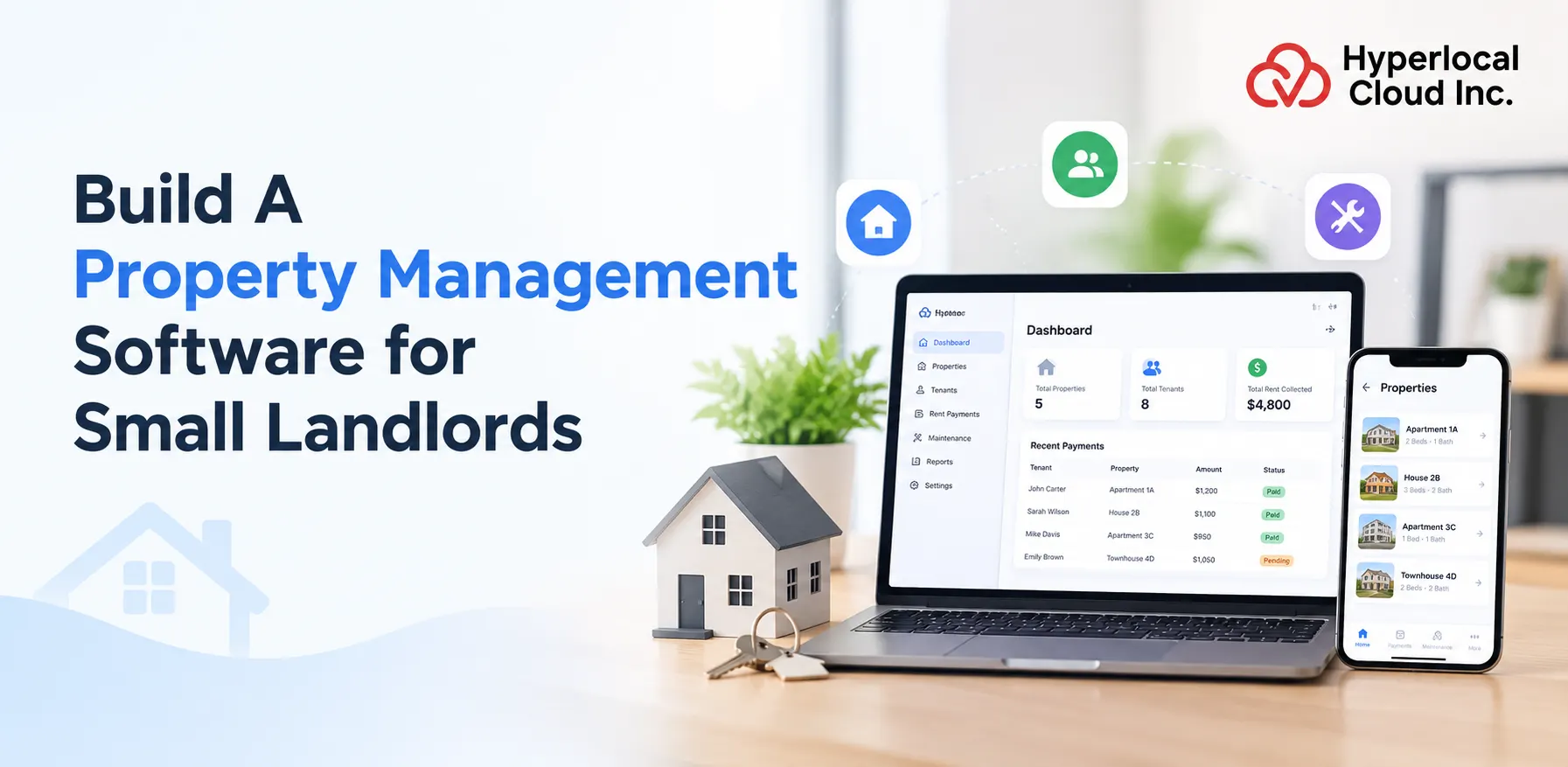
A financial dashboard can display monthly income, outstanding rent, recorded expenses, and net rental cash flow based on available data. Reports can be filtered by property, tenant, or reporting period.
For greater accuracy, the system should distinguish between collected income, expected rent, refundable deposits, and unpaid balances rather than treating all recorded amounts as revenue.
Property Listings and Vacancy Management
Landlords need a convenient way to track occupied and vacant rental units. A property management platform can store property descriptions, rental prices, availability dates, photographs, and occupancy status.
For platforms that support marketing, landlords may also publish property listings, manage inquiries, and track prospective tenants. This helps connect vacancy management with the tenant onboarding process.
Document Storage and Digital Signatures
Rental agreements, inspection reports, receipts, maintenance invoices, and other property documents should be accessible from a secure document management area.
Useful capabilities include document categorization, search, download permissions, expiry reminders, and version history where appropriate. Electronic signature integrations can help landlords manage eligible agreements digitally, subject to applicable legal requirements.
Tenant Screening and Rental Applications
Tenant screening can help landlords organize applications before signing a lease. Depending on the market and available integrations, the system may collect application details, employment information, references, and consent for background or credit checks.
The platform should protect applicant information and follow applicable privacy, fair housing, consumer reporting, and data protection requirements.
Automated Notifications and Communication
Automated notifications keep landlords and tenants informed about important rental activities. The platform can send alerts for upcoming rent payments, overdue balances, expiring leases, new maintenance requests, and scheduled inspections.
Notifications may be delivered through email, SMS, push notifications, or in-app messages. Users should be able to manage notification preferences, while critical account and security notifications should follow appropriate safeguards.
Mobile Access and Owner Dashboard
Small landlords may manage properties outside regular office hours. A responsive web platform or dedicated mobile application allows them to review payment statuses, approve maintenance requests, contact tenants, and access property information remotely.
The dashboard should prioritize the most useful information, including:
-
Total properties and occupied units.
-
Upcoming and overdue rent.
-
Open maintenance requests.
-
Leases approaching expiration.
-
Recent income and expenses.
-
Important pending tasks.
Data Security and User Permissions
Property management software stores personal information, financial records, and contractual documents. Security should be included from the beginning rather than added after development.
Essential measures include secure authentication, role-based access controls, encrypted data transmission, appropriate data encryption at rest, regular backups, activity logs, and a defined data retention policy. Multi-factor authentication can provide additional protection for sensitive accounts.
Get Expert Guidance for Your Software Project
Types of Property Management Software You Can Build
Before starting development, determine which type of property management platform best matches the target users and business model.
Residential Rental Management Software
This solution focuses on houses, apartments, condominiums, and other residential rental units. Common features include tenant records, lease management, rent tracking, maintenance requests, and property expense reports.
It is a suitable starting point for businesses serving individual landlords and small residential property owners.
Multi-Property Management Software
A multi-property platform allows landlords to manage multiple buildings, addresses, and rental units from one account. It should support property-level reporting, unit-level occupancy, centralized tenant records, and consolidated financial views.
This option is useful for property owners who are expanding beyond a single rental unit.
Rental Accounting Software
Rental accounting software focuses on financial recordkeeping. It helps users categorize transactions, track rent received, record expenses, review outstanding payments, and generate financial summaries.
It can operate as a standalone product or as a financial module within a broader property management platform.
All-in-One Landlord Management Platform
An all-in-one system combines tenant management, rent collection, maintenance, leasing, document storage, and financial reporting. It provides a centralized environment for handling most rental management activities.
This approach can deliver more value to landlords who want to replace several disconnected tools with one solution.
Mobile-First Property Management Application
A mobile-first application prioritizes essential tasks on smartphones, such as checking rent payments, sending reminders, responding to maintenance requests, and reviewing lease information.
A mobile-first approach is especially useful when the target audience prefers managing properties while travelling or away from a computer. A responsive web application can be a cost-effective first step before investing in separate native applications.
How to Build Property Management Software Step by Step
Developing property management software requires a structured process that connects business requirements with technical implementation. The following stages help keep the project focused on the needs of small landlords.
Step 1: Define Business Goals and Target Users
Start by identifying who will use the software and which problems the platform should solve. An application for individual landlords may require a simpler workflow than a platform serving property management companies.
Determine whether the product will be used internally, sold as a subscription service, or offered as a white-label solution to other businesses.
Document the expected user groups, business model, target market, pricing approach, and primary success metrics. These decisions influence the features, architecture, integrations, and budget.
Step 2: Research Competitors and Market Requirements
Study existing landlord and property management platforms to understand their features, pricing models, strengths, and limitations.
Evaluate how competitors handle rent collection, maintenance, lease management, tenant communication, and reporting. Pay attention to recurring complaints, unnecessary complexity, and features that may be too expensive for small landlords.
Interview prospective users or gather feedback through surveys. Ask which tasks consume the most time, what they currently use, and which problems they would pay to solve.
Market research should also cover local lease requirements, payment preferences, privacy rules, and any regulations affecting the intended market.
Step 3: Select Essential Features for an MVP
An MVP, or minimum viable product, is the first usable version of the software. It includes the essential features needed to solve a clearly defined problem without requiring a full enterprise-grade platform.
For a small landlord management system, the MVP could include:
-
Landlord registration and secure login.
-
Property and rental unit management.
-
Tenant profiles and lease records.
-
Rent schedules and payment tracking.
-
Basic maintenance request management.
-
Expense recording and financial summaries.
-
Email notifications and reminders.
-
A simple administrative dashboard.
Advanced accounting integrations, predictive analytics, complex vendor marketplaces, and multiple native mobile applications can be introduced later if customer demand justifies the investment.
Step 4: Design the UI/UX and User Workflows
The user interface should make routine property management tasks easy to complete. Small landlords may not have dedicated administrative teams, so the software should minimize the number of steps required for common activities.
Create wireframes and interactive prototypes for the main screens, including the landlord dashboard, property details, tenant profiles, payment records, and maintenance requests.
Design clear navigation, readable financial summaries, simple forms, and helpful status indicators. Test the prototype with prospective users before moving into full development.
Step 5: Choose the Technology Stack
Select technologies according to the product’s expected scale, integrations, security requirements, development budget, and maintenance capabilities.
The stack may include a modern web frontend, a backend framework, a relational database, cloud hosting, and third-party services for payment processing and notifications.
The architecture should support secure access, reliable recordkeeping, and future expansion without introducing unnecessary complexity during the MVP stage.
Step 6: Develop the Frontend, Backend, and Database
The frontend provides the interface through which landlords and tenants use the platform. It includes dashboards, property forms, tenant records, payment screens, and maintenance workflows.
The backend handles business logic, authentication, data validation, payment status updates, notifications, and access permissions. APIs connect the frontend with the backend and relevant third-party services.
The database stores properties, units, tenants, leases, payment records, expenses, maintenance requests, and user permissions. Data relationships should be planned carefully so that information remains associated with the correct landlord, property, tenant, and transaction.
For multi-customer platforms, tenant isolation must be enforced throughout the application to prevent one landlord from accessing another landlord’s private information.
Step 7: Integrate Payments, Notifications, and Third-Party Tools
Integrations can expand the platform’s capabilities without requiring every service to be developed from scratch.
Depending on the target market, integrations may include payment gateways, email services, SMS providers, electronic signature tools, accounting software, and identity verification services.
Payment integration should account for transaction status updates, failed payments, refunds, duplicate notifications, and reconciliation. Sensitive payment details should be handled according to the payment provider’s security requirements rather than stored unnecessarily.
Step 8: Test Security, Usability, and Performance
Testing helps identify problems before the software is released to customers.
Functional testing should verify that users can create properties, add tenants, update lease information, record payments, and resolve maintenance requests correctly. Payment workflows should be tested using the provider’s test environment.
Security testing should examine authentication, permissions, input validation, tenant data isolation, and protection against common application vulnerabilities.
Usability testing should confirm that landlords can complete routine tasks without confusion. Performance testing can help identify slow pages, database bottlenecks, and problems that may emerge as the number of properties and users increases.
Step 9: Launch, Monitor, and Improve the Software
After testing, deploy the platform to a production environment and configure backups, monitoring, error reporting, and recovery procedures.
Provide onboarding guidance so landlords can add their first properties, import relevant records, configure rent schedules, and invite tenants. A straightforward onboarding experience can reduce early user frustration.
After launch, monitor user feedback, feature adoption, support requests, and recurring technical issues. Use this information to prioritize improvements instead of adding features without evidence of demand.
Best Technology Stack for Property Management Software
The technology stack determines how the platform is developed, deployed, secured, and maintained. The best choice depends on the expected user base, required integrations, available development expertise, and long-term product roadmap.
Frontend Technologies
The frontend is the part of the software that landlords and tenants interact with directly.
Common options include:
-
React: Suitable for interactive dashboards and reusable interface components.
-
Next.js: Useful for building React-based applications with routing and server-rendering capabilities where needed.
-
Vue.js: An alternative for building responsive and maintainable web interfaces.
-
Flutter: An option for developing cross-platform mobile applications.
For an initial landlord platform, a responsive web application may be sufficient. Separate mobile applications can be introduced when user needs and business goals justify the additional investment.
Backend Frameworks
The backend manages application logic, database operations, authentication, integrations, and notifications.
Possible technologies include Node.js with NestJS or Express, Python with Django or FastAPI, and PHP with Laravel.
Choose a framework that supports secure development, reliable API design, testing, and long-term maintenance. A well-structured application is often more important than selecting a fashionable technology.
Database and Cloud Infrastructure
A relational database is generally suitable for property management systems because the data contains connected records, such as properties, tenants, leases, transactions, and maintenance requests.
PostgreSQL and MySQL are common choices. The platform can run on cloud infrastructure such as AWS, Microsoft Azure, or Google Cloud, depending on operational needs and the development team’s expertise.
Cloud deployment can support automated backups, monitoring, access controls, and capacity expansion. Production environments should also include disaster recovery planning and appropriate data retention policies.
Payment and Third-Party Integrations
The platform may integrate with payment providers, email delivery services, SMS gateways, electronic signature tools, and accounting applications.
Select providers based on availability in the target market, supported currencies, transaction costs, reliability, and compliance requirements.
Security and Scalability
Security should be part of the architecture from the beginning. Use secure authentication, role-based permissions, encrypted connections, validated inputs, audit logs, and controlled access to sensitive records.
The system should also support future growth through efficient database queries, caching where appropriate, background processing for notifications, and monitoring of application performance.
For a small landlord-focused MVP, avoid unnecessary microservices and complex infrastructure unless there is a clear technical reason to use them.
Build Your Property Management Software Today
How Much Does It Cost to Build Property Management Software?
The cost of developing property management software depends on the development approach, number of features, platform requirements, integrations, design complexity, and security needs.
A simple landlord dashboard with tenant records and rent tracking requires less investment than a multi-tenant SaaS platform with online payments, accounting integrations, advanced reporting, and dedicated mobile applications.
Estimated Development Cost
The following figures are illustrative planning estimates in USD, not vendor quotations. Actual pricing depends on scope, location, team rates, and implementation requirements.
| Development approach | Estimated cost |
|---|---|
| Basic MVP | $10,000–$25,000 |
| Feature-rich custom platform | $25,000–$75,000+ |
| Advanced platform with web and mobile applications | $75,000–$150,000+ |
| Our White-label solution | $8,000 to $9,000 |
These estimates are broad budgeting ranges rather than guaranteed market prices. A white-label product may reduce the initial development effort, but licensing fees, customization, integrations, hosting, and ongoing support must be evaluated separately.
Factors Affecting Development Costs
Feature complexity: Basic property records and rent tracking cost less to implement than automated payment processing, advanced accounting, and complex reporting.
Platform selection: A responsive web application can be more economical initially than building separate native applications for iOS and Android.
Third-party integrations: Payment providers, electronic signatures, tenant screening, and accounting services may introduce integration and recurring service costs.
UI/UX design: Custom dashboards, specialized workflows, and extensive usability testing affect the design budget.
Security and compliance: Authentication, permission management, audit logs, data protection, and market-specific legal requirements need appropriate development and testing.
Maintenance and support: Software requires ongoing updates, bug fixes, monitoring, backups, infrastructure management, and compatibility improvements after launch.
How to Reduce Development Costs
Start with an MVP that solves the most important landlord problems. Use established frameworks and managed infrastructure where suitable, and integrate reliable third-party services instead of building every capability from scratch.
Avoid launching with features that have not been validated by users. A phased development plan allows the business to test demand and expand functionality based on actual feedback.
White-Label vs. Custom Property Management Software
Businesses planning to launch property management software can choose between a white-label solution and custom development. Both approaches can work, but they differ in initial effort, flexibility, and ownership arrangements.
What Is White-Label Property Management Software?
White-label property management software is a prebuilt platform that can be adapted to a business’s branding and, depending on the provider, configured for its intended market.
It may include existing modules for property records, tenant management, rent tracking, maintenance, and reporting. The exact feature set varies by vendor.
This approach can help businesses enter the market without building every core component from the beginning.
Benefits of White-Label Software
-
Faster launch: Existing software can reduce the time required for initial implementation.
-
Lower initial development effort: Core functionality may already be available.
-
Brand customization: Supported branding options can help create a consistent customer experience.
-
Prebuilt functionality: Existing modules may cover common landlord workflows.
-
Simplified implementation: The provider may offer deployment assistance and technical support.
However, buyers should verify customization limits, licensing terms, source code access, hosting arrangements, data portability, update policies, and recurring fees before selecting a provider.
Benefits of Custom Property Management Software
Custom development allows businesses to design the platform around specific operational requirements and customer needs.
Advantages include:
-
Greater control over product features and workflows.
-
Flexibility to support specialized business models.
-
Custom integrations with existing systems.
-
Control over the development roadmap.
-
Greater freedom to build differentiated functionality.
Custom development generally requires more planning, development effort, and ongoing technical responsibility. Source code ownership depends on the contract and should be explicitly defined.
Which Option Should You Choose?
White-label software may suit businesses that want to validate demand, launch quickly, and use established functionality. Custom development may be better when the business needs unique workflows, specialized integrations, or greater control over its product architecture.
A third option is a hybrid approach: start with a configurable platform and invest in custom functionality as the business grows. The right decision should be based on total cost of ownership, product requirements, time to market, and long-term flexibility.
Benefits of Property Management Software for Small Landlords
Property management software can improve rental operations by reducing manual work and keeping essential information accessible. Its value depends on how well the features match the landlord’s daily requirements.
Save Time Through Automation
Automated rent reminders, lease expiry notifications, maintenance updates, and recurring administrative tasks reduce the amount of manual follow-up required. Landlords can spend more time on property upkeep and tenant relationships.
Improve Rent Collection and Financial Visibility
A centralized payment dashboard helps landlords identify received payments, overdue rent, and upcoming due dates. Financial reports also help them understand rental income and expenses across individual properties.
Simplify Maintenance and Tenant Communication
A dedicated maintenance workflow makes it easier to record issues, assign repairs, communicate progress, and maintain service histories. Centralized communication reduces the risk of missing important tenant requests.
Keep Property Records Organized
Digital storage allows landlords to organize lease agreements, receipts, inspection reports, tenant information, and repair records. Searchable records make it easier to retrieve documents when needed.
Support Portfolio Growth
As a landlord acquires additional properties, a centralized platform helps maintain consistent workflows across multiple units. Features such as property-level reports, role-based access, and consolidated dashboards become increasingly useful as operations expand.
Common Challenges and How to Overcome Them
Building property management software involves operational, technical, and regulatory considerations. Addressing these challenges early can reduce development risks and improve the product experience.
Protecting Tenant and Payment Data
The platform may contain personally identifiable information, lease agreements, and financial records. Weak access controls or inadequate security practices can expose this information.
How to overcome it: Implement secure authentication, least-privilege access, encryption, audit logs, regular backups, and security testing. Use established payment providers and avoid storing sensitive payment information unnecessarily.
Managing Lease and Legal Requirements
Rental laws, security deposit rules, tenant screening requirements, and electronic signature regulations vary across jurisdictions.
How to overcome it: Identify the initial target market and obtain appropriate legal guidance. Build configurable lease templates, reminders, and recordkeeping workflows without assuming that one legal process applies everywhere.
Integrating Payment and Accounting Systems
Payment and accounting integrations may behave differently across providers. Transactions can fail, arrive late, be refunded, or require reconciliation.
How to overcome it: Use documented APIs, test error handling, maintain transaction references, and distinguish pending, completed, failed, and refunded payments. Reconcile records regularly.
Keeping the Software Simple
Adding too many features can make a landlord-focused product difficult to use. Small property owners generally need straightforward workflows rather than an overly complicated enterprise interface.
How to overcome it: Prioritize the most common tasks, test the interface with real users, provide guided onboarding, and introduce advanced functionality only when it delivers clear value.
Ensuring Data Accuracy and Reliability
Incorrect lease dates, duplicated transactions, or inconsistent property records can affect financial reporting and tenant communication.
How to overcome it: Use input validation, database constraints, transaction-safe updates, audit trails, and automated tests. Provide clear correction workflows for authorized users.
Request a Property Management Software Demo
How Hyperlocal Cloud Can Help You Build Property Management Software
Launching property management software requires more than developing a dashboard. Businesses must plan their product architecture, configure essential features, integrate third-party services, and establish a reliable process for deployment and maintenance.
Hyperlocal Cloud can be presented as a potential development partner for businesses exploring property management software solutions, including white-label and custom development approaches. The specific services, available modules, licensing terms, and delivery capabilities should be confirmed before making product-specific claims.
White-Label Property Management Solutions
A white-label approach can help businesses establish a branded property management platform using existing software capabilities. Depending on the solution, the platform may be configured to support landlord accounts, property records, tenant workflows, rent tracking, and maintenance management.
Before choosing a solution, confirm which features are included, what customization is possible, and whether the platform supports the intended business model.
Custom Features and Branding
Businesses with specialized requirements may need custom workflows, tailored dashboards, market-specific payment integrations, or unique reporting features.
A defined scope helps determine whether these requirements can be handled through configuration or require additional development.
Scalable Web and Mobile Development
A property management product may begin as a responsive web application and expand into mobile applications as customer needs evolve. The architecture should support the planned growth without adding unnecessary complexity at launch.
Third-Party Integrations and Ongoing Support
Payment gateways, notification services, accounting tools, and electronic signature providers can extend the platform’s capabilities. Businesses should also plan for maintenance, security updates, performance monitoring, and technical support after deployment.
If you are planning to launch a property management platform, discuss your target audience, required features, budget, and preferred deployment model with the Hyperlocal Cloud team to determine the most suitable approach.
FAQs (Frequently Asked Questions)

Patt Cummins is an experienced content writer with over 10 years of experience creating clear and engaging content for technology-focused industries. He specializes in simplifying complex technical topics into easy-to-understand stories that educate readers, support brand communication, and help businesses effectively share their solutions.

Need Help With
Development?