- Build a Teladoc Clone App with doctor search, booking, video consultations, payments, chat, and digital prescriptions.
- Add AI, analytics, and healthcare integrations for advanced functionality.
- Prioritize security, privacy, and applicable healthcare compliance.
- White-label solutions start at $8,000, while custom development can range from $15,000 to $60,000+.
- Partner with an experienced telemedicine app development company like Hyperlocal Cloud for scalable development and long-term support.
The healthcare industry is rapidly moving toward digital-first healthcare experiences. Patients increasingly expect convenient access to doctors, virtual consultations, appointment scheduling, digital prescriptions, medical records, and healthcare services through their smartphones. This transformation has created significant opportunities for entrepreneurs, healthcare providers, startups, and businesses looking to launch their own telemedicine platforms.
Teladoc has become a well-known example of how technology can connect patients with healthcare professionals through virtual care. Its model demonstrates how a well-designed telehealth platform can simplify doctor consultations while creating a scalable healthcare ecosystem.
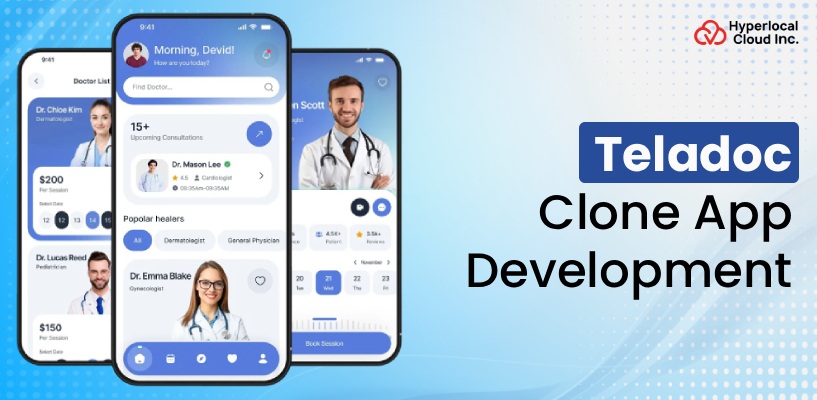
If you are planning to launch a similar platform, developing a Teladoc Clone can provide a practical starting point. A modern Teladoc clone app can combine patient management, doctor discovery, appointment scheduling, video consultations, digital prescriptions, payments, notifications, and administrative management into one platform.
This guide explains how to build an app like Teladoc, the essential features, development process, technology stack, security requirements, monetization models, and estimated development costs.
What Is Teladoc, and How Does It Work?
Teladoc is a digital healthcare platform that enables patients to access healthcare professionals remotely. Instead of visiting a physical clinic for every consultation, users can discover healthcare providers, schedule appointments, communicate with doctors, and receive healthcare services digitally.
A Teladoc-style platform generally brings three major stakeholders together:
- Patients
- Doctors and healthcare professionals
- Platform administrators
Patients can create profiles, search for healthcare professionals, schedule appointments, participate in virtual consultations, make payments, and access medical information.
Doctors can create professional profiles, manage availability, accept appointments, conduct consultations, communicate with patients, and provide digital prescriptions or treatment recommendations.
Administrators manage the complete ecosystem, including users, doctors, appointments, payments, reports, content, subscriptions, and platform operations.
This multi-sided structure makes telemedicine platforms highly scalable and suitable for different healthcare business models.
Get Expert Consultation for Your Teladoc Clone App Development Project
Why Build an App Like Teladoc?
The growing adoption of remote healthcare services has created opportunities for businesses to build specialized telemedicine platforms.
Developing an app like Teladoc can help businesses:
Expand Healthcare Accessibility
Patients can connect with healthcare professionals without necessarily traveling to a clinic. This can be particularly useful for people living far from healthcare facilities or users who require convenient follow-up consultations.
Improve Patient Convenience
Users can search for doctors, book appointments, receive reminders, and attend consultations through their smartphones.
Create New Healthcare Revenue Streams
A telemedicine platform can generate revenue through consultation fees, subscriptions, commissions, premium services, partnerships, and other healthcare-related offerings.
Support Healthcare Providers
Doctors can manage appointments and consultations digitally while expanding their reach beyond a physical clinic.
Build a Scalable Healthcare Business
A properly designed platform can support multiple specialties, healthcare professionals, locations, languages, currencies, and service models.
Enable 24/7 Digital Access
Depending on the business model and provider availability, telemedicine platforms can support healthcare access beyond traditional clinic hours.
How Does a Teladoc Clone App Work?
A Teladoc clone app generally follows a straightforward digital healthcare workflow.
Step 1: Patient Registration
Patients register using their phone number, email address, or supported authentication methods.
They can create a healthcare profile containing relevant personal information, preferences, and medical details.
Step 2: Doctor Discovery
Patients can search for doctors based on:
- Specialty
- Location
- Availability
- Consultation type
- Experience
- Languages
- Ratings
- Consultation fees
Step 3: Appointment Booking
The patient selects a doctor and an available time slot and books a consultation.
The platform can automatically send appointment confirmations and reminders.
Step 4: Online Consultation
At the scheduled time, patients and doctors can connect through video, audio, or secure chat.
Step 5: Digital Prescription
After the consultation, the doctor can provide a digital prescription or treatment recommendations where legally and clinically appropriate.
Step 6: Payment
Patients can pay for consultations using supported payment methods.
Step 7: Medical Records
Relevant consultation information, prescriptions, and healthcare documents can be securely stored for future reference.
This workflow can be customized according to the healthcare market, specialty, regulatory requirements, and business model.
Key Features of a Teladoc Clone App
A successful telemedicine platform needs more than video calling. It requires a complete digital ecosystem connecting patients, healthcare professionals, and administrators.
Patient App Features
Easy Registration and Login
Patients should be able to create accounts quickly using email, phone number, social authentication, or other supported methods.
Patient Profile
Users can manage their personal information, healthcare preferences, medical history, and other relevant details.
Doctor Search
Advanced search enables patients to find suitable doctors according to specialty, availability, experience, consultation fee, language, and other criteria.
Doctor Profiles
Doctor profiles can display:
- Name
- Specialty
- Qualifications
- Experience
- Languages
- Consultation fee
- Availability
- Ratings and reviews
- Professional information
Appointment Scheduling
Patients can view available time slots and schedule appointments according to their preferences.
Video Consultation
Secure video consultation allows patients and doctors to communicate remotely.
Audio Consultation
Audio calling can provide an alternative when video consultation is not required or internet bandwidth is limited.
Secure Chat
In-app messaging can facilitate communication between doctors and patients before, during, or after consultations.
Digital Prescriptions
Doctors can create and share digital prescriptions where permitted by applicable regulations.
Medical Records
Patients can access relevant healthcare information, consultation history, prescriptions, and uploaded documents.
Payment Integration
The application can integrate payment gateways to process consultation fees and other transactions.
Push Notifications
Notifications can remind users about:
- Upcoming appointments
- Appointment confirmations
- Consultation updates
- Payment status
- Prescription availability
- Platform announcements
Ratings and Reviews
Patients can rate healthcare professionals after consultations, subject to appropriate moderation and platform policies.
Doctor App Features
The doctor application should provide healthcare professionals with tools to manage their digital practice.
Doctor Registration
Healthcare professionals can submit registration and professional information for verification.
Doctor Profile Management
Doctors can update:
- Professional biography
- Specialty
- Qualifications
- Experience
- Consultation fees
- Availability
- Languages
- Profile image
Availability Management
Doctors can define working hours, consultation slots, holidays, and availability.
Appointment Management
Doctors can view upcoming, completed, canceled, and pending appointments.
Video and Audio Consultation
Healthcare professionals can conduct remote consultations through supported communication features.
Patient Information
Doctors can access permitted patient information needed to provide appropriate care.
Digital Prescription
Doctors can generate digital prescriptions and consultation recommendations according to applicable regulations.
Earnings Dashboard
Doctors can monitor consultation earnings, transaction history, commissions, and payouts.
Notifications
Doctors can receive alerts about new appointments, cancellations, payments, messages, and other important events.
Admin Panel Features
The administrator dashboard provides centralized control over the platform.
User Management
Administrators can manage patient accounts, account status, profiles, and activity.
Doctor Management
The system can support healthcare professional onboarding, verification, approval, profile management, and account monitoring.
Appointment Management
Administrators can monitor bookings, cancellations, completed consultations, and disputes.
Payment Management
The admin panel can provide visibility into transactions, commissions, refunds, payouts, and revenue.
Content Management
Administrators can manage healthcare content, FAQs, banners, notifications, categories, and informational pages.
Analytics and Reports
Analytics can help businesses understand:
- User growth
- Doctor registrations
- Consultation volume
- Revenue
- Appointment trends
- Popular specialties
- Cancellation rates
- Platform performance
Request a Free Demo of Our Teladoc Clone App and Explore Its Key Features
Advanced AI Features for Telemedicine Apps
However, AI should be designed as a supportive technology rather than a replacement for qualified medical professionals.
Potential AI-powered capabilities include:
AI Symptom Assistance
An AI system can collect user-reported symptoms and provide general informational guidance while directing users toward appropriate healthcare services.
Intelligent Doctor Matching
AI can help recommend healthcare professionals based on user-selected requirements, specialty, availability, and other platform data.
Healthcare Chatbot
An AI-powered assistant can answer common platform questions and help users navigate the application.
Automated Appointment Assistance
AI can help users identify available consultation slots based on their preferences.
Medical Documentation Assistance
AI-based tools can potentially assist with administrative documentation and information organization, subject to healthcare regulations and appropriate clinical safeguards.
Personalized User Experience
AI can help personalize content, reminders, and platform recommendations based on permitted user interactions and preferences.
Technology Stack for a Teladoc-Like App
The technology stack depends on the platform’s requirements, expected user volume, features, integrations, and scalability goals.
A typical architecture may include:
Frontend
- React
- Next.js
- Flutter
- React Native
- Swift
- Kotlin
Backend
- Node.js
- Python
- Java
- PHP
- .NET
Database
- PostgreSQL
- MySQL
- MongoDB
- Redis
Cloud Infrastructure
- AWS
- Microsoft Azure
- Google Cloud
Video Communication
A telemedicine platform can integrate secure video communication services or build communication infrastructure based on its requirements.
Payment Processing
Payment gateways can be integrated to support consultation payments, subscriptions, refunds, and other transactions.
Notifications
Push notification services can be integrated to send appointment reminders and important platform updates.
Analytics
Analytics platforms can help businesses understand user behavior, healthcare service utilization, operational performance, and revenue.
The final technology stack should be selected based on the application’s requirements rather than simply copying another company’s technology choices.
How to Build an App Like Teladoc
Building a telemedicine application involves several stages.
1. Define Your Business Model
Start by defining the healthcare services your platform will provide.
Determine whether the application will focus on:
- General healthcare
- Specialist consultations
- Mental wellness
- Dermatology
- Women’s healthcare
- Pediatric care
- Chronic care
- Corporate healthcare
- Prescription services
A clearly defined business model helps determine the application’s functionality.
2. Conduct Market Research
Research your target audience, competitors, healthcare providers, regulations, pricing models, and market opportunities.
Identify gaps in existing telemedicine services that your application can address.
3. Define MVP Features
Instead of building every possible feature immediately, create an MVP containing essential functionality.
A typical MVP may include:
- Patient registration
- Doctor registration
- Doctor profiles
- Search
- Appointment booking
- Video consultation
- Chat
- Payments
- Notifications
- Admin dashboard
Additional features can be introduced after validating the business model.
4. Design the User Experience
Healthcare applications need simple and intuitive interfaces.
Patients should be able to find doctors and schedule appointments without unnecessary complexity.
Doctors should have easy access to appointments, patient information, consultations, and professional tools.
5. Develop the Application
The development team builds the mobile applications, web interfaces, backend systems, APIs, dashboards, integrations, and database architecture.
6. Integrate Healthcare Services
Depending on the business model, integrations may include:
- Video consultation
- Payment gateways
- Notifications
- Electronic health records
- Identity verification
- Analytics
- Cloud services
- Healthcare APIs
7. Implement Security
Security controls should be integrated throughout development rather than added at the end.
8. Test the Platform
Testing should cover:
- Functional testing
- UI testing
- API testing
- Security testing
- Performance testing
- Compatibility testing
- Payment testing
- Video consultation testing
9. Launch
After successful testing and appropriate compliance reviews, the application can be deployed to the relevant platforms.
10. Maintain and Scale
Post-launch maintenance is important for fixing bugs, improving performance, introducing new features, updating dependencies, and scaling infrastructure.
Business Models for a Teladoc-Like App
A telemedicine platform can generate revenue through multiple models.
Commission Model
The platform can charge a percentage or service fee on consultations.
Subscription Model
Patients or healthcare providers can subscribe to premium plans.
Pay-Per-Consultation
Users pay individually for each consultation.
Provider Subscription
Doctors or healthcare organizations can pay recurring fees for platform access.
Corporate Healthcare Plans
Businesses can provide telemedicine access to employees through corporate packages.
Premium Services
Additional digital healthcare services can be offered through premium plans where appropriate.
The right monetization strategy depends on the target market, healthcare regulations, provider economics, and customer expectations.
Build Your Own Teladoc Clone App With Advanced Telemedicine Features
How Much Does It Cost to Build an App Like Teladoc?
The cost to build an app like Teladoc depends on the development approach, features, customization requirements, technology stack, integrations, security requirements, and scalability.
For businesses looking for a faster and more cost-effective launch, a White Label Telemedicine App can be a suitable option. Businesses that require a completely unique platform can choose custom development.
White-Label Teladoc App Cost: Starting at $8,000
A white-label Teladoc-style solution can start at approximately $8,000. This approach provides businesses with a pre-built telemedicine foundation that can be customized with their branding, design elements, workflows, and selected features.
A white-label solution can include core functionality such as:
- Patient registration and profiles
- Doctor registration and profiles
- Doctor search and discovery
- Appointment scheduling
- Video consultations
- Audio and chat consultations
- Digital prescriptions
- Payment integration
- Push notifications
- Patient and doctor dashboards
- Admin panel
- Basic analytics and reporting
The final price can vary depending on the level of customization, additional integrations, platform requirements, and features selected.
Custom Teladoc-Like App Development Cost: $15,000–$60,000+
For businesses that need a unique healthcare platform with customized workflows, advanced functionality, and specialized integrations, custom Telemedicine App Development can start from around $15,000 and can go up to $60,000+.
The final development cost depends on the complexity and scope of the project.
A typical cost range can be considered as follows:
- Basic custom telemedicine app: $15,000–$25,000
- Advanced telemedicine platform: $25,000–$40,000
- Feature-rich healthcare platform: $40,000–$60,000+
- Enterprise-level solution: $60,000+ depending on requirements
Custom development can include advanced features such as AI-powered healthcare assistance, sophisticated doctor matching, multiple consultation types, EHR integrations, advanced analytics, subscription management, multilingual functionality, multi-currency payments, remote patient monitoring, third-party healthcare integrations, and customized administrative workflows.
Teladoc Clone vs Custom Telemedicine App: Which Is Better?
A Teladoc-style clone solution can be useful when speed and cost efficiency are priorities.
A custom telemedicine application may be more suitable when the business requires unique workflows, specialized healthcare services, extensive integrations, or highly differentiated user experiences.
A clone does not necessarily mean creating an exact copy of another company’s product. Instead, it can refer to building a platform inspired by an established business model while developing original branding, design, functionality, and workflows.
Businesses should choose the approach based on their:
- Budget
- Target audience
- Launch timeline
- Required features
- Scalability plans
- Compliance requirements
- Customization needs
Future of Telemedicine App Development
Telemedicine is expected to continue evolving as healthcare providers and patients adopt digital healthcare services.
Future platforms are likely to focus on:
- AI-assisted healthcare workflows
- Remote patient monitoring
- Wearable device integration
- Personalized healthcare experiences
- Digital therapeutics
- Advanced healthcare analytics
- Connected health ecosystems
- Virtual care
- Preventive healthcare
- Remote chronic-care management
AI and connected devices can further expand the capabilities of telemedicine platforms, but healthcare businesses will need to maintain strong attention to patient safety, privacy, security, and regulatory requirements.
How Hyperlocal Cloud Can Help Build Your Teladoc Clone
Building a telemedicine platform requires a combination of healthcare workflows, mobile technology, cloud infrastructure, security, integrations, and scalable backend architecture.
Hyperlocal Cloud can help businesses develop a customized Teladoc Clone designed around their target market and business requirements.
The solution can be tailored for:
- Startups
- Healthcare organizations
- Entrepreneurs
- Clinics
- Doctor networks
- Healthcare enterprises
- Digital health businesses
From patient and doctor applications to administrative dashboards and backend infrastructure, the platform can be developed to support a complete digital healthcare ecosystem.
Businesses can also choose a white-label approach when they want to launch their healthcare platform with customized branding and functionality.
FAQs (Frequently Asked Questions)

Nisha Bagga is a technical writer with more than 7 years of experience creating high-quality content for a wide range of industries. She specializes in developing clear, engaging, and well-researched technical and business content tailored to diverse audiences and industry requirements.

Need Help With
Development?