Shop Clone : Build All-in-One Shopping App Like Shop
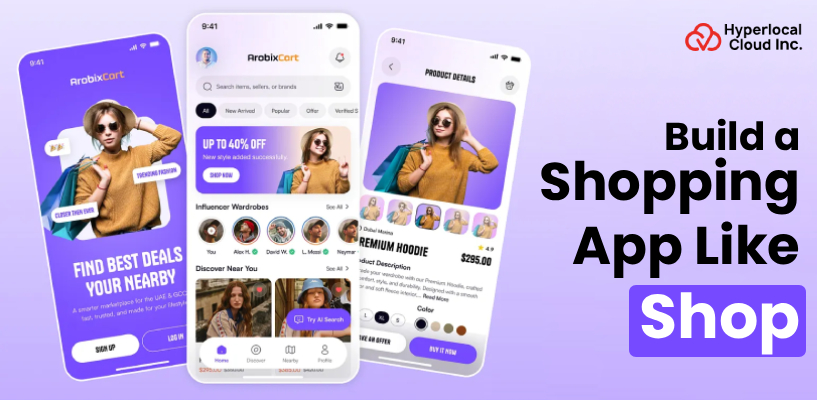
Shop app by Shopify has changed the way individuals follow orders, find products, and even shop online, all in a single location. It made the buying experience faster, smarter, and more personal. Nowadays, buyers want a smooth shopping experience via apps that can update and provide personalized suggestions in real-time. The market is shifting towards super-apps that integrate browsing, buying, and tracking capabilities under a single platform.
Mobile trade is experiencing an explosion, and billions of dollars are being spent annually via the applications. In the case of businesses, the creation of a similar all-in-one shopping platform is not an option anymore; it is a strategic decision to be competitive, enlist loyal users, and grow in the digital-first economy.
Introduction To The Shop App
Shop is a mobile application that is free of cost and was developed by Shopify to facilitate online shopping and make it more structured. It also allows you to monitor all the orders in one location, new products, and check out more quickly with previously saved payment information. Shop automatically organizes all tracking updates instead of having to look through several emails to track them. It also provides products according to your preference, and that is why it is an individualized shopping assistant in your pocket.
Discover the must-have features for your shopping app
How All-in-One Shopping App Like Shop Function
Shop clone app works as your personal shopping companion by connecting buyers, sellers, and deliveries in one smooth, easy-to-use platform. Here’s how it works for users:
Step 1: Download & Sign Up
The Shop app is downloaded by the user on the App Store or Google Play Store. They can register in a few seconds using their email address.
Step 2: Inbox Sync
The application automatically reads the inbox of the user. It seeks out all previous order confirmation e-mails and pulls them together.
Step 3: Order Dashboard
All the current orders are well displayed in the home dashboard. Users are able to view all the order statuses without opening an email.
Step 4: Real-Time Tracking
On clicking on any order, users can get real-time tracking updates. The application displays the precise location of the package at any given time.
Step 5: Delivery Notifications
The shop has push notifications at each shipping milestone. Users are notified when orders ship, are delivery-ready, or received.
Step 6: Browse & Discover
The users scroll through a feed of customized products and stores. Suggestions are made based on previous buying and window shopping.
Step 7: Follow Favorite Stores
Shoppers are able to subscribe to their favorite store using Shopify. They are updated about new arrivals, sales, and special offers.
Step 8: Add to Cart
Shoppers can browse products and place them in their cart. All this is stored in the app so that it can be accessed easily.
Step 9: Fast Checkout with Shop Pay
Address and payment information are saved and get auto-filled at checkout. The process is a single-tap purchase where the user does not have to do anything additional to purchase.
Step 10: Post-Purchase Tracking
Once an order is purchased, the new order is displayed immediately on the dashboard. It is tracked in real time by the users between dispatch and doorstep delivery.
Why Investing In A Shop Clone App Is A Smart Move
The retail market is evolving at a rapid pace, and mobile applications are at the forefront. Currently, investing in a Shop clone app has your business at the place where the cash and customers are.
| Advantages | Description |
| Mobile Commerce Is Booming | The number of people shopping on their phones is higher than ever. Developing a mobile shopping application will mean that one is tapping into a market that is increasing in size on a daily basis. |
| High User Retention | One-stop shopping applications retain customers on a regular basis. Users have no incentive to go elsewhere when tracking, discovery, and checkout are located in a single location. |
| Multiple Revenue Streams | An online marketplace opens up possibilities to make a commission, run advertisements, and work with elite sellers. You are not relying on any single source of income to develop your business. |
| Scalable Business Model | This kind of application can begin with only a few sellers and buyers and expand to thousands. The value of the platform increases with the number of users and stores registered over time. |
| Competitive Market Advantage | Those having their own shopping app are distinguished from those who do not have one. It generates brand loyalty and customer loyalty, and you have complete control over the shopping experience. |
Essential Features Of A Shop-Style Shopping App
The Shop clone panels are shaped to enhance the experience of users, sellers, and administrators handling the platform. Here are the features each panel holds:
User Panel Features
1. Easy Registration & Login
The users are able to create accounts fast through email or using social accounts. They only need to log in to the app in a few seconds.
2. Personalized Product Feed
The home feed will display the products according to the interests and previous purchases of the user. Each user will have a different feed that is user-focused.
3. Real-Time Order Tracking
Users are able to follow up on all orders in real-time when they have been shipped. The constant reporting of their delivery process makes them aware of the situation.
4. Push Notifications
Orders, deals, and new arrivals are altered immediately. Users do not even miss a critical update of their favorite stores.
5. One-Tap Checkout
This is because saved payment and address information make the process of checking out excruciatingly quick. Users make their purchase with only a single tap without having to fill out forms again.
6. Wishlist & Save for Later
Users are able to add the products they love to their wishlist at all times. This will easily enable one to revisit and buy them in the future.
7. Store Following
Users have an option to subscribe to their favorite stores and to be updated. They are informed whenever there is something new in a store that they are following.
8. Product Search & Filters
An intelligent search engine assists the user in locating what they need. The filters, such as price, category, and rating, streamline the process of browsing.
9. Review & Rating System
Users may make reviews and ratings for all purchases. That assists other customers in making more confident and better decisions with regard to buying.
10. In-App Customer Support
The users can contact the support directly via the app and solve the problems very fast with the help of such a feature as quick support.
Seller Panel Features
1. Easy Store Setup
Sellers are able to make and customize the profile of a store in a short period. Setting up a straightforward procedure that makes their shop online and sells within a short time.
2. Product Listing Management
The products can be added, edited, or removed with complete details with ease by the sellers. It is possible to manage high-quality images, descriptions, and prices all in one place.
3. Order Management Dashboard
Any new orders will be displayed in a well-structured dashboard. Sellers are able to take all orders and update them through one screen.
4. Inventory Tracking
The sellers receive real-time notifications in case of a low stock level. This assists them in replenishing in time and never missing a sale.
5. Sales Analytics & Reports
Good reports present the sales performance in detail daily, weekly, and monthly. This data will enable sellers to make more intelligent business decisions.
6. Discount & Coupon Management
It is easy to offer special offers, discount codes, and seasonal offers to the sellers.These advertisements aid in improving the number of customers purchasing and the total sales.
7. Customer Communication
The sellers would be able to directly text the customer about their orders or questions. Quick and effective communication creates trust and enhances customer satisfaction.
8. Shipping & Delivery Management
It is easy to set the shipping prices, areas, and delivery periods. They are also able to combine with logistics partners to have their orders fulfilled easily.
9. Payment & Payout Tracking
Vendors are able to track all the incoming funds and outstanding payments. Their finances are in an ordinary and stress-free system of payment.
10. Store Performance Insights
Sellers would be able to see the most viewed and sold products. These lessons would enable them to emphasize what works and refine what does not.
Admin Panel Features
1. Users Management
All user and seller accounts can be viewed, controlled, and managed by admins. They may approve, suspend, or dismiss any account as they see fit.
2. Product & Category Control
Admins will be able to sort products into categories and accept new listings. This makes the site neat, pertinent, and simple to navigate for all.
3. Commission & Revenue Management
Admins can determine the commission rates of sellers per sale. All the claims flow, and earnings are monitored and handled in a single location.
4. Order Monitoring
All orders made on the site can be seen by the admin. They will be able to intervene and solve all the problems concerning the orders in a short time.
5. Promotions & Banner Management
Promotional banners can be published anywhere in the app by admins; a promoted deal or seasonal campaigns can be initiated with a couple of clicks.
6. Push Notification Control
Whenever an admin wants to send targeted push notifications to users and sellers, they can. This makes everyone aware of the changes and promotions, as well as the news of the platform.
7. Payment Gateway Management
The admins are able to add and control various payment methods on the app. All transactions done in this panel are to ensure that transactions are smooth and secure.
8. Reports & Analytics Dashboard
There is a comprehensive dashboard with a view of the performance, the sales, and user activity across the platform. This data is used by admins to monitor growth and develop strategies in the future.
9. Dispute & Refund Management
Buyers and sellers can be fairly and easily taken care of by the admins. The panel can review the refund request and process it.
10. App Settings & Configuration
Admins are free to modify app settings, policies, and platform settings whenever they wish. They will still retain complete authority over the appearance and functionality of the app.
Build your own all-in-one shopping app today
AI-Enhanced Functionalities In An Integrated Shopping App
The following artificial intelligence features operate silently behind the scenes to enable customers to shop more quickly and effortlessly, and more pleasurably for every user.
1. AI-Powered Product Recommendations
The AI learns the browsing history and previous purchases of the user, their interests, and provides the most suitable products. Each of the recommendations seems to be personalized as it is constructed depending on the individual behavior of a shopper.
2. Smart Search & Auto Suggestions
AI knows what is required by the user even when one enters incomplete or misspelled words. It displays the most relevant results and suggestions immediately, and thus the process of searching is rendered quick and frustration-free.
3. Personalized Shopping Feed
The AI provides an individual feed of the content to each user depending on their preferences and activity. There is no common feed that two users will view since it is on an individual basis, and the app learns and adjusts to the individual.
4. AI-Powered Chatbot Support
There is a smart chatbot that is present 24 hours a day to respond to the user’s questions and solve typical problems in real time. It comprehends the natural language and provides useful answers without the users having to wait till a human agent responds.
5. Predictive Order Tracking
Artificial intelligence interprets shipping information and delivery trends to determine the correct delivery time of all orders. Customers benefit from reliable estimated delivery dates, so they are always aware of when their package will arrive.
6. Dynamic Pricing Suggestions
AI follows the market tendencies, demand rates, and prices of competitors to propose the most intelligent product prices. This assists the sellers to remain competitive, and the buyers get the perception that they are always getting a fair deal.
7. AI-Based Visual Search
One can post a picture of any product, and the artificial intelligence will locate other products like it on the site. This facilitates the ease and intuition in finding products, particularly when users are not able to get the right words to describe what they want.
Complete Process For Shop Clone App Development
Creating a strong shopping application like Shop must have a strategy, appropriate technology, and a progressive approach to development. The final product is trustworthy, replicable, and prepared to deliver a wonderful experience to all users through a structured process.
1. Market Research & Planning
Information is thoroughly researched prior to the code being written to know the market, competitors, and target audience. The team determines the features required, what issues the app will address, and who the users will be. This is because a good plan at this stage will save a lot of time and money when the real development process comes.
2. UI/UX Design
Designers make wireframes and visual prototypes that demonstrate precisely what the app will appear like and feel like. Each screen, button, and flow direction is designed with a lot of caution, and the experience is made to be easy and intuitive. This is to create an interface that is easy enough to use without confusion for anyone.
3. Developing the App
In this stage, we will focus on Shop clone app development. There are two approaches that are usually used to develop the app: one is custom-based, and the other is a white-label solution. If you choose a custom-based approach, then it will require you to develop the app from scratch and will require more time (months) and investment. Or if you decide to purchase a white-label ecommerce app, then you can simply rebrand it as your own and launch it quickly (in a week) in the market. It generally requires less investment than a custom approach.
4. AI & Third Party Integrations
This step implies integration of the app with AI services, payment gateways, shipping partners, and other third-party services. Such AI capacities as smart suggestions, chatbot responses, and fraud detection are combined to make the application smarter. These integrations bring with them the features that can be very powerful to the app without necessarily developing all the features.
5. Testing & Quality Assurance
All features, screens, and functions are carefully tested by a special team before the app is launched. They seek bugs, performance problems, and vulnerabilities in order to ensure that everything is fine. No application comes out without going through several stages of testing on various devices and systems.
6. Launch & Post Launch Support
Once the testing is finished, the app is submitted to the App Store and Google Play, where it is publicly posted. The team is enthusiastic about monitoring performance immediately after launching it and correcting any issues as soon as they are reported by the actual users. Introduced features, continuous support, and updates make the app develop and improve continuously.
Talk to our experts and bring your app idea to life
Monetization Approaches for the Shop Clone Platform
Creating a shopping application is an achievement in itself, but what is more important is becoming a successful business. The smart ways to make a consistent income from your platform and ensure that both buyers and sellers are satisfied simultaneously are numerous.
| Monetization Approaches | Description |
| Commission on Every Sale | The site makes a little percentage on each successful action between a buyer and a seller. It will generate a reliable and automatic flow of income, which increases in scale each day as more sales are made on the platform. |
| Seller Subscription Plans | Sellers can enjoy monthly or annual packages of subscriptions with varying features and benefits. Simple plans are free, and advanced plans that have more features, greater visibility, and priority support are priced at a fee. |
| Featured Listings & Sponsored Products | Sellers are able to pay to have their products displayed at the top of search results and category pages. This makes their products more visible and gives them better chances of being discovered by the shoppers who are searching to make purchases. |
| In-App Advertising | The companies and advertisers will be able to conduct targeted banner ads, promotion campaigns, and sponsored content within the application. The platform has high shopping traffic, and therefore, advertising space is very valuable to the businesses that require further exposure. |
| Transaction & Payment Processing Fees | The platform has a small convenience fee charged on each payment made using the built-in payment system of the platform. This provides another layer of revenue that silently pulls in money on each and every purchase one makes without causing any distraction to the user experience. |
Wrapping Up!
The popularity of the Shop app is proof that all-in-one shopping applications are the future of mobile shopping. Those companies that make their moves to build all-in-one shopping apps like Shop now will have a huge advantage in leading this emerging market. Hyperlocal Cloud stands tall as a custom app development company, providing robust, feature-based shopping apps. We also offer clone app solutions at affordable pricing starting at $7,000. Our professional team is at work to create your dream platform, whether you are new or expanding. Get your own free demo today and make the first step towards your successful business in the sphere of shopping.

Patt Cummins is an experienced content writer with over 10 years of experience creating clear and engaging content for technology-focused industries. He specializes in simplifying complex technical topics into easy-to-understand stories that educate readers, support brand communication, and help businesses effectively share their solutions.

Need Help With
Development?