Boomplay Clone: Launch A Music Streaming App Like Boomplay
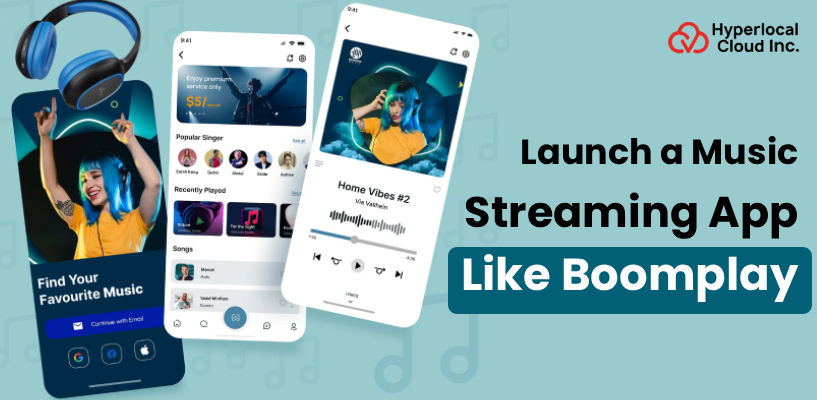
The streaming of music has radically changed the way individuals find and listen to audio content – and the commercial potential of the same continues to expand. The platforms have begun to fight over monthly active users in the global markets, and the adoption of streaming has been greatly uneven by location and demographics.
Boomplay established a hegemony in Africa with its emphasis on local content and mobile-first design- a strategy that has shown you do not have to out-Spotify Spotify to be successful. In the case of businesses interested in the music-tech space, creating an app like Boomplay can be a viable solution to reach previously underserved audiences with a scalable, customized product.
What is the Boomplay App?
Boomplay is an African music streaming service that provides millions of songs from local and international artists. It operates on a mobile-first, freemium model – users can access it free of charge with advertisements, and a premium subscription allows them to listen to music offline and without ads. The difference is that it is highly regional and offers lower costs through pricing strategies that match local economies, and features lightweight applications designed with low-end gadgets in mind. It’s become one of Africa’s most downloaded music apps.
Launch Your Own Boomplay Clone Today
How a Boomplay-Style Music Streaming App Actually Works
In the background of the slick interface is a Boomplay-like application that operates off of an uncomplicated content-delivery model, which keeps users interested and artists paid.
• User Registration & Profiles
Users can register through email, phone, social login, and specify their music preferences. This information fuels one-on-one suggestions during the initial session.
• Content Library & Licensing
It contains a licensed library of music, albums, and podcasts of labels and independent artists. The content is sorted into genre, mood, trending lists, and geographical popularity.
• Search & Discovery Engine
Customers browse the music based on search, curated playlists, and algorithmically-based recommendations. Intelligent suggestions are enhanced with time, depending on the listening patterns and activity.
• Streaming & Playback
Tracks are being served through adaptive bitrate streaming, changing the audio quality with network conditions. This makes it easy to play even on slower mobile networks.
• Subscription & Monetization
Free-tier users will listen to ads between tracks, and premium subscribers will be able to listen to ads and download offline. This is a hybrid model that maximizes both coverage and income.
• Artist Dashboard & Payouts
Artists and labels can use a backend dashboard to upload their content, view streams, and earnings. The payouts in royalties are determined by the number of streams and are in the form of a share of subscription revenue.
Why Investing in a Boomplay-Like App Makes Business Sense
The music streaming industry is growing rapidly, and a properly placed app has the potential to drive revenue streams where every additional user increases revenue.
Recurring Revenue Model
Subscription-based income generates a predictable, compound cash flow every month. Even the free version with advertisements enables it to have a constant stream of advertising income as your user base increases.
Massive Addressable Market
Music streaming has been embracing hundreds of millions of users around the world, and there are still markets yet to be reached. The new meaning of building is to gain audience share before saturation occurs in the new geographical areas.
Multiple Monetization Channels
There are several other monetization channels that you can use besides subscriptions and advertisements, including in-app purchases, branded playlists, concert promotions, and artist collaborations. This diversification will eliminate reliance on a particular source of revenue.
High User Retention
Music application is inherently motivating due to its ability to induce daily usage since individuals listen during their trips, exercises, and free time. The loyalty patterns of stickiness are directly converted to higher lifetime customer value.
Scalable Infrastructure
Cloud streaming infrastructure implies that you can expand between thousands or millions of users without having to recreate your technology stack. The expenses increase in direct proportion to the demand, as opposed to the large investment at the start-up stage.
Data-Driven Growth Opportunities
Any stream, skip, or playlist creation creates behavioral data that you can capitalize on. These insights are used to make better recommendations, more intelligent ad targeting, and make informed content licensing decisions.
Get a White Label Music App in Weeks
Features That Make a Boomplay-Style App Stand Out
An effective music streaming application should be composed of an appropriate balance between the user-friendly gloss and the server horsepower to ensure that the listeners are engaged and the processes are operating smoothly.
User Panel Features
1. Personalized Home Feed
Users have a custom home screen that displays suggested songs, albums, and playlists based on their listening history. This makes the experience new and pertinent each time they open the app.
2. Smart Search & Filters
The user can filter by song title, artists, albums, genre, or even by lyrics. Their advanced filters allow them to be more specific in their search by language, mood, or year of release.
3. Curated & Custom Playlists
The application provides editorially curated playlists as well as the possibility to make and share personal playlists. Playlists of other listeners or artists can also be followed by the user.
4. Offline Download Mode
Premium members will be allowed to download songs and playlists to listen to them offline without mobile data usage. This is particularly useful to users in regions that have limited or high connection costs.
5. Lyrics Display
Lyrics can be viewed in real time as an action song is played on the screen, so that the user can sing. This is a minor detail that dramatically increases the session time and interest.
6. Sleep Timer
This enables the user to set a time to automatically pause playback after a specified period. It is an easy yet much-needed facility among nighttime listeners.
7. Social Sharing
Listeners can share songs, albums, or playlists to social media or messaging apps. This makes all users your potential marketing platforms.
8. Equalizer Settings
The built-in audio equalizer allows users to set the bass, treble, and middle range according to their headphone or speaker configuration. It allows more control of sound by the listeners.
9. Multi-Device Sync
Playback syncs across phone, tablet, desktop, and smart speakers. Users are able to play a song on one device and resume playing on another.
10. Push Notifications & Alerts
Customers can be notified about new releases of artists they follow, new playlists, and subscription offers. Immediate communications motivate re-engagement and decrease churn.
Artist Panel Features
1. Content Upload & Management
Directly through a special dashboard, artists can add tracks, albums, and EPs. They can correct metadata, which includes titles, cover art, genres, and release dates, anytime.
2. Stream Analytics
Summary of overall streams, demographics of listeners, geographical coverage, and trending playlists. Artists are able to visualize the location and performance of their music.
3. Revenue & Payout Tracking
An open revenue dashboard displays royalty payments by track and sums paid out over time. There is never confusion on the part of the artists on what they should receive and when.
4. Profile Customization
The artists can personalize their profile page by adding bios and photos, social links, and featured tracks. A very appealing profile will establish a reputation and attract new followers.
5. Fan Engagement Tools
In-built messaging or announcement functions enable artists to interact with their followers directly. It gives a more intimate artist-fan relationship without the use of third-party means.
6. Playlist Pitching
Songs in the editorially curated playlists can be pitched by artists. Streams and exposure can be significantly boosted by being featured in a popular playlist.
7. Release Scheduling
Artists have the option to schedule future releases to be released on a particular date and time. This helps to match drops to the marketing campaign and social media promotion.
8. Collaboration Requests
An option that allows artists to find and meet other musicians on the site to collaborate with them. It promotes fan base cross-promotion and community building.
9. Copyright & Dispute Management
Artists are able to mark unauthorized content use and handle copyright claims via the dashboard. This secures their content and instills confidence in the site.
10. Promotional Tools
In-built features to do discounted listening campaigns, promotional codes, or sponsored placements within the app. These are the instruments to enable an independent artist to increase their audience without a large marketing budget.
Admin Panel Features
1. User & Artist Management
The admins can access, edit, suspend, or delete user and artist accounts through a centralized dashboard. Role-based access control is used to ensure that sensitive operations are performed by authorized team members.
2. Content Moderation
All music uploaded can be reviewed to detect copyright violations, obscene material, or policy violations. One click enables admins to approve, flag, or remove content.
3. Revenue & Subscription Dashboard
This is a live dashboard with subscription sign-ups, ad earnings, and the overall platform earnings. Admins are able to monitor financial health and identify trends without having to switch between tools.
4. Royalty Calculation & Payouts
The system will automatically compute artist royalty as per the number of streams and according to revenue split agreements. The admins are able to review, approve, and process bulk payouts on a scheduled basis.
5. Analytics & Reporting
There is detailed reporting on user increase, retention, content performance, and geographic breakdowns. These are insights used to make decisions in marketing expenditure, content licensing, and feature development.
6. Push Notification Manager
Push notifications can be created, scheduled, and targeted to a set of users according to behavior or demographics. This motivates engagement campaigns without the use of a different marketing tool.
7. Ad Campaign Management
An in-built application to organize ad placements, frequency limits, and measure performance of the ad under the free tier. This makes the experience of the ad balanced and the revenue per impression maximized.
8. Licensing & Contract Tracker
Administrators can archive and manage licensing agreements with labels, distributors, and independent artists. The team will get automated notifications when any of the licenses have expired to make sure that they are renewed in time.
9. Platform Settings & Configuration
Global subscription pricing, region-supported areas, language, and content policy are in a single settings hub. Updates occur throughout the platform without the involvement of the developers.
10. Security & Compliance Tools
There will be in-built data encryption, GDPR compliance, fraud detection, and access logging, which will ensure the safety of the platform and the users. Admins are able to audit the activity trails and react to security incidents in a short time.
Join the Music Streaming Wave with a Boomplay Clone
AI-Powered Features That Give Your Boomplay Clone App a Competitive Edge
Artificial intelligence is what distinguishes a simple music player from a smart streaming platform that makes users return to it day by day. Here are the AI-driven features that can make your app stand out in the market.
AI-Driven Music Recommendations
The app is capable of learning your taste through listening patterns, skips, and favorites, as time goes by. It then recommends songs, albums, and artists that suit their tastes uniquely with more and more precision.
Smart Playlist Generation
AI automatically generates a personalized playlist by moods, activities, timings of the day, or other recent listening history. New mixes are offered to the users with a lift of the finger, and this keeps the engagement high.
Voice Search & Commands
It is possible to search for songs, play, and request recommendations by speaking to the device. This hands-free experience comes in handy, particularly when one is driving, cooking, or having workouts.
Audio Fingerprinting & Song Recognition
The application has the capacity to recognize a song that is playing in the background by listening to a brief section of the song. This has the effect of a built-in Shazam that will automatically add known songs to the user’s library.
Mood & Context Detection
The AI detects the mood, key, and energy level of audio content to automatically classify songs by their mood. This supports mood-based browsing to enable users to discover music that matches precisely with their mood.
Automated Content Moderation
AI filters uploaded tracks against copyright infringement, duplication, and explicit content even before they are posted. This will save you the manual checking time on the part of your administrator and leave the catalog in order.
Predictive Churn Analysis
ML can spot users who are disengaging based on their session duration or notification ignored. The system is then able to initiate personalized re-engagement offers or content recommendations prior to the user canceling.
Dynamic Ad Targeting
AI is the matching of ads with individual users depending on their demographics, listening behavior, and engagement patterns. This provides increased click-through rates to advertisers and a less obtrusive ad experience to listeners on the free tier.
How to Build a Music Streaming App Like Boomplay
In order to create a Boomplay clone app is a systematic process that transforms your idea into a fully developed product that can enter the market. Let’s understand how to create a music streaming app!
Step 1: Market Research & Competitor Analysis
Start by researching existing platforms to learn what works, what users complain about, and where the gaps exist. This study defines your special value proposition and prevents you from creating features that no one desires.
Step 2: Define Core Features & MVP Scope
Have a list of the must-have features of your first version and distinguish between the must-have features and the nice-to-have additions to add later. A narrow MVP allows you to get to market quicker and keeps development costs down.
Step 3: UI/UX Design & Prototyping
Designers develop wireframes and interactive prototypes that outline all the screens and user flows in the app. This prevents the interface that comes out before one line of code is written from looking and feeling intuitive and appealing.
Step 4: Boomplay Clone App Development
There are two ways for Boomplay clone app development: one is custom-based, and the other is purchasing a white-label solution. Custom-based approach requires the app to be developed from scratch and requires more time and investment. On the other hand, a white-label solution is one that you can purchase and rebrand as your own and launch within a week or two. These solutions are comparatively affordable.
Step 5: API & Third-Party Integrations
The app has integrations with payment gateways, social media, analytics, and music licensing APIs. These integrations offer the much-needed functionality without the necessity to develop all features.
Step 6: Quality Assurance & Testing
Both manual and automatic testing are done on the entire app to identify bugs, performance issues, and security issues. The testing is carried out on all devices, screen sizes, and network conditions to ensure a smooth experience everywhere.
Step 7: Deployment & Post-Launch Support
The completed app gets delivered to app stores and implemented on cloud servers with monitoring solutions available. The team will also deal with bug fixes, performance, and rollout of features after the launch, according to actual user feedback.
How a Boomplay-Like App Makes Money
An excellent music streaming application can earn you income from various sources, which gives your business the financial leeway and space to grow.
1. Freemium Subscription Model
Have a free level with advertisements and a restricted set of features, and a paid premium level with offline downloads and no advertisements. This will help to attract a large number of users and convert a percentage of them to paying subscribers in the long run.
2. In-App Advertising
Show audio advertisements between songs and banner advertisements or video advertisements in the app interface to users on the free tier. Advertisers are charged on impressions or clicks, and this will generate a continuous stream of income that will increase with the number of active users.
3. Artist & Label Partnerships
Artists and labels can pay to be displayed with a premium placement (such as featured placements on the home screen or as part of trending playlists). Such promotional collaborations earn you income and help artists access more people through your platform.
4. In-App Purchases & Add-Ons
Sell more content like premium content, early access to new releases, virtual concert tickets, or hi-res audio upgrades. They are either single or recurring purchases that will add extra revenue to the normal subscriptions and advertisements.
5. White-Label Licensing
License the technology of your platform to other businesses or local brands who would like to start their own branded streaming music service. This is a B2B revenue stream that allows you to sell your tech stack without having to compete with the same end users.
Turn Listeners into Loyal Fans with Your Boomplay Clone App
Key Takeaways!
The music streaming market is ripe, and having an app like Boomplay is a proven business model to join the emerging market. Using the appropriate features, intelligent AI implementation, and an effective revenue model, you can launch a music streaming app like Boomplay that will be attractive to users and will produce actual revenue. In Hyperlocal Cloud, we specialize in developing quality clone app solutions and white-label solutions at low costs, starting at $8,000. We can assist you in constructing a full-custom building or a ready-to-launch one. Get in touch with us today to talk about your project!
FAQs (Frequently Asked Questions)
Which platforms should I target first?
Most businesses start with Android and iOS, followed by web apps.
How do I get music licensing rights?
You need agreements with record labels, publishers, and licensing agencies to legally stream music.
Can I launch without music licenses?
No, streaming copyrighted music without licenses can lead to legal issues.
What is the role of AI in music apps?
AI helps with personalized recommendations, playlists, and user behavior analysis.
How do I attract users to my app?
Marketing strategies include social media, influencer partnerships, and free trials.
How do I handle large user traffic?
Use scalable cloud infrastructure and load balancing.
Is it possible to white-label a Boomplay clone?
Yes, many companies offer ready-made solutions that can be customized.
Can I launch a region-specific music streaming app?
Yes, focusing on regional or local content can help you stand out and attract a loyal audience.
How do I ensure data security?
Use encryption, secure authentication, and compliance with data protection laws.

Patt Cummins is an experienced content writer with over 10 years of experience creating clear and engaging content for technology-focused industries. He specializes in simplifying complex technical topics into easy-to-understand stories that educate readers, support brand communication, and help businesses effectively share their solutions.

Need Help With
Development?